
last updated Updated
October 16, 2026
11 min read

Disclaimer: Statements made in this article are opinions*
Overview of Fax.Plus’s
Key Claims
According to Fax.Plus, it is a cloud-based fax solution that allows users to send and receive faxes via desktop, Android, iOS, email, and multi-function printers. It also claims that its Enterprise plan supports HIPAA compliance and that the platform can be incorporated into workflows through email-to-fax, fax-to-email, cloud integrations (e.g., Google Workspace, Microsoft applications, Slack, and Zapier), and APIs to streamline processes.
Who is Fax.Plus For?
Fax.Plus describes its solution as serving the needs of both occasional users and high-volume enterprises, with over 4,000,000 customers worldwide. Its corporate solutions are marketed as serving industries including healthcare, education, legal services, financial services, IT, and real estate. It offers tiered plans to meet the needs of individuals, small businesses, and large organizations:
- Individuals and sole proprietors who send or receive faxes only occasionally for personal or professional needs.
- Small and medium-sized businesses (SMBs) looking for a simple and cost-effective way to handle faxing.
- Larger organizations that seek to accommodate multiple users or integrate faxing with their digital workflows.
- Professionals and users in regulated industries who must handle sensitive documents securely via encrypted channels.
- Remote teams working across devices and platforms, requiring cloud-based storage and cross-device flexibility.
Customer Reviews: What Users Really Think About Fax.Plus
Fax.Plus’ website highlights the platform’s convenience, flexibility, security, workflow integration, and more. How do these promises stack up when the rubber meets the road? I dug into third-party and app store reviews to see what users say.
Fax.Plus Reviews
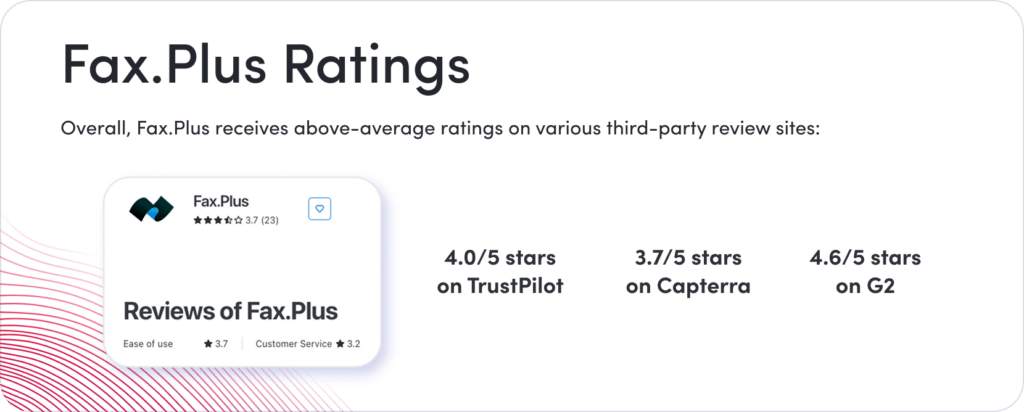
G2: 4.6/5 stars
(57 reviews)
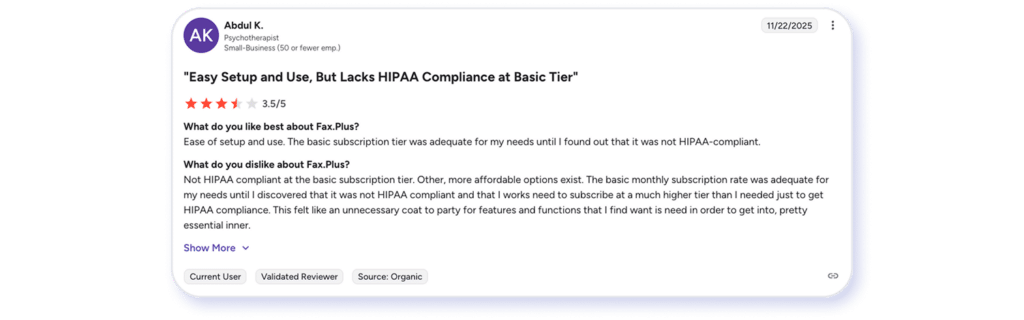
Reviews from small business users often reference Fax.Plus’s ease of use. However, users from mid-market companies, such as those in IT and administration roles, encounter challenges with third-party integrations, unclear error codes, and inadequate documentation. Several are frustrated by the admin console’s limited capabilities and its enterprise workflow support.
Some reviewers, particularly small business owners in regulated industries, noted that the Basic plan does not include HIPAA-compliant security features. As a result, they had to pay more for a higher-tier plan to meet compliance needs, even if they do not require the higher fax volume.
Fax.Plus Reviews
Capterra: 3.7/5 stars
(23 reviews)
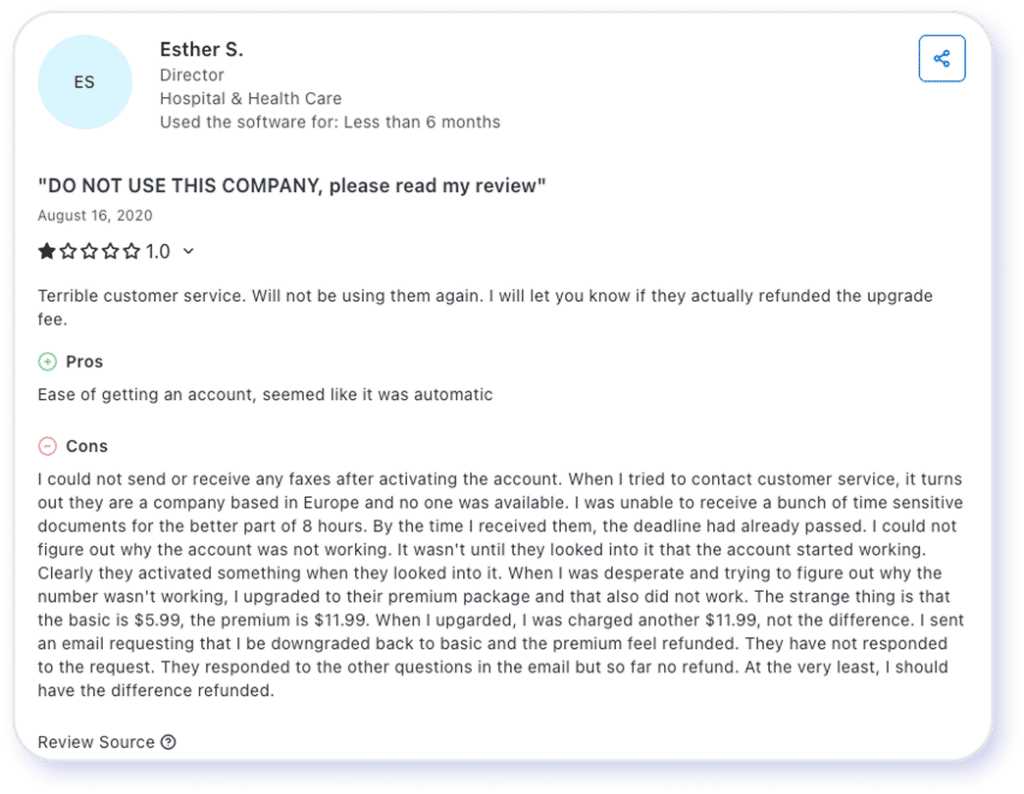
Similar to G2, many reviewers on Capterra are service professionals or small business owners. Capterra reviews from users at mid-market organizations, particularly those in IT and administrative roles, highlight challenges related to third-party integrations, unclear error codes, and insufficient documentation.
One reviewer cautioned about the way Fax.Plus counts the number of faxes: “We imported two fax lines to Fax.Plus and had multiple users who could access the faxes. It was never explained that every user who potentially had access to the fax (showing up in their inbox) counted as an individual fax. So, if someone faxed us 2 pages, but 25 people had access, then it counted as 40 pages.”
Fax.Plus Reviews
Google Play: 4.7/5 stars
(23 reviews)
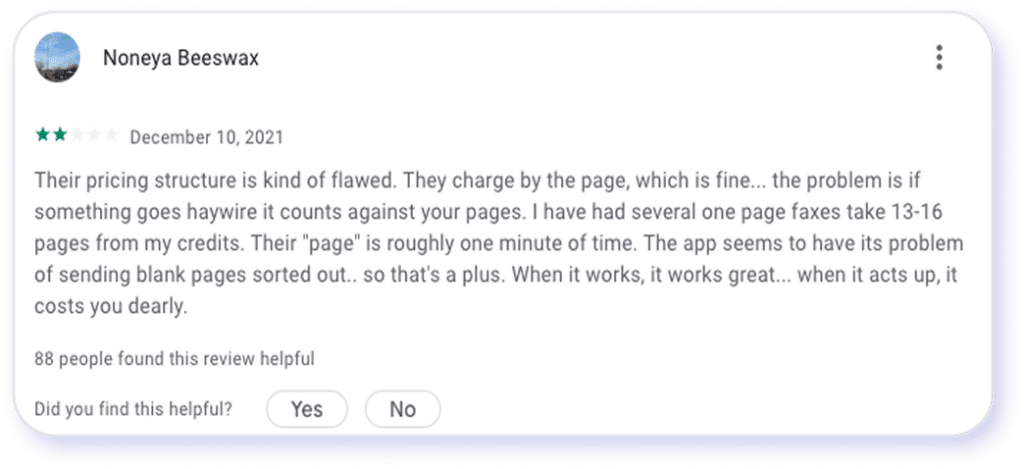
Some reviewers expressed concerns regarding Fax.Plus’ pricing structure and customer service, while others reported satisfaction with the platform’s security features and overall mobile app experience. Some reviewers were not happy with Fax.Plus’ pricing structure and customer service. For example, a user complained that the app charges for pages that got a “failed communication error” and were not sent. It can be quite frustrating to send one page and be charged for ten!
Fax.Plus Reviews
Apple App Store: 4.7/5 stars
(9.6k reviews)
Similar to G2, many reviewers on Capterra are service professionals or small business owners. Capterra reviews from users at mid-market organizations, particularly those in IT and administrative roles, highlight challenges related to third-party integrations, unclear error codes, and insufficient documentation.
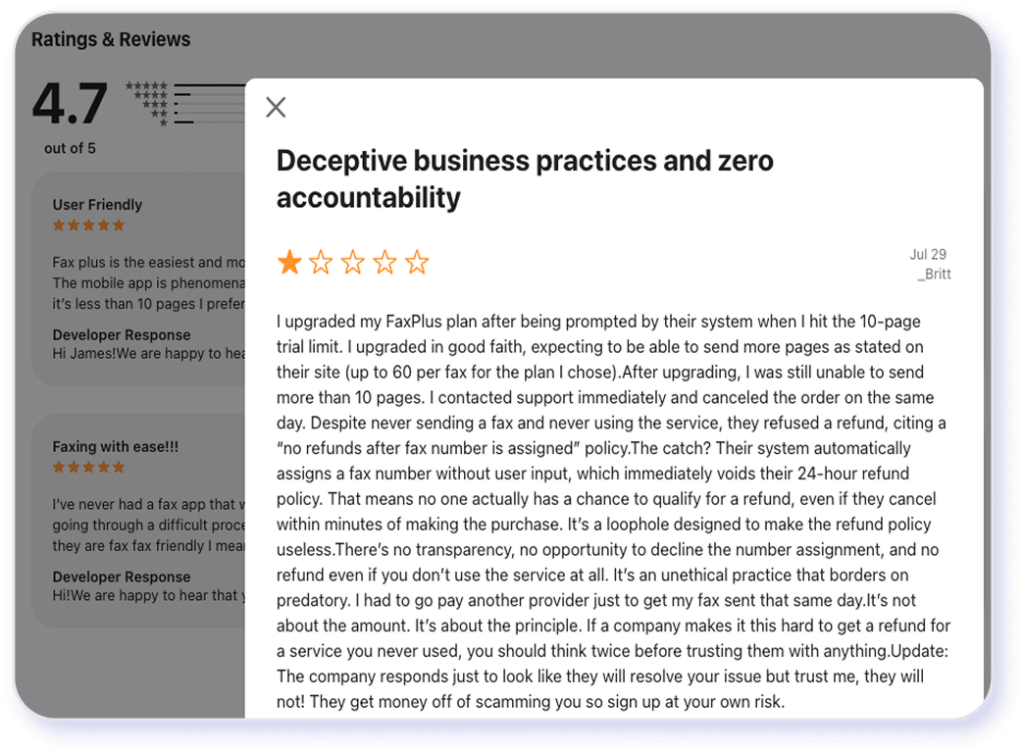
Some reviewers expressed concerns regarding Fax.Plus’ pricing structure and customer service, while others reported satisfaction with the platform’s security features and overall mobile app experience. Some reviewers were not happy with Fax.Plus’ pricing structure and customer service. For example, a user complained that the app charges for pages that got a “failed communication error” and were not sent. It can be quite frustrating to send one page and be charged for ten!
Fax.Plus Features Breakdown
Selecting the right cloud-based fax solution for your needs means delving into the details. For example, can the software handle specific file types? What are its search and archiving capabilities? Are the security functions you need available to the plan you choose? I signed up for the Basic plan and took it out for a spin to see how essential features stack up.
File Format Flexibility and Large File Support
Fax.Plus supports a limited set of file formats — the usual suspects like PDF, text, basic Microsoft Office documents (i.e., DOC/DOCX, XLS/XLSL), and a handful of image formats (e.g., JPG, PNG, TIFF). Meanwhile, you can only attach 10 files per transmission.
The platform’s inability to handle zipped files can make sending multiple files quite a chore. Moreover, it can only send files up to 30MB (compared to eFax’s 3 GB), limiting its ability to handle large or complex documents, such as high-resolution images, presentations, or large PDFs.
Bottom line: If you’re an occasional user seeking a simple interface to send mostly small, text-based files (e.g., PDF forms), Fax.Plus may be an option to consider. However, it’s less flexible and robust for handling large files, nonstandard document types, or bulk faxes.
Built-In e-Signature Workflow
New users get 28 days of free access to Sign.Plus, Fax.Plus’ sister e-signature app. However, if you want to continue using this feature, the service starts at $9.99 per month for one user (billed annually). Another consideration is that many advanced security features, and by extension, some of the more robust signing ones, are only available through the top-tier Enterprise plan ($79.99/mo, billed annually).
Bottom line: The cost-benefit ratio of adding the e-signature feature weakens if you only e-sign occasionally and don’t need advanced security features (e.g., HIPAA compliance).
Cloud Storage and Searchable Archive
Fax.Plus advertises “unlimited storage,” but some users have reported issues with “odd behaviors” related to its storage/archive features. Moreover, the file-size and format limitations imply that the ability to store or retrieve large or complex documents may not be as good as a solution built for large-file sharing.
Also, the platform doesn’t have Optical Character Recognition (OCR) technology to make fax content searchable. It can become quite challenging to find specific information within documents if it’s not recorded in the metadata or the cover page.
Bottom line: Fax.Plus’ cloud storage capacity is sufficient for casual users and smaller businesses, and its simplicity is a plus. However, consider an alternative if you want a reliable solution that lets you search through reams of documents with OCR so that you can find what you need when you need it.
Business-Level Features
You can only access Fax.Plus’ advanced features through higher-tier plans that cost more. These include multiple concurrent transmissions, Slack/Zapier/API integrations, shared contacts, masking fax numbers in the header, team management dashboard, and single sign-on (SSO). Some reviewers were disappointed to learn that the Basic or Premium plans don’t offer the features they need.
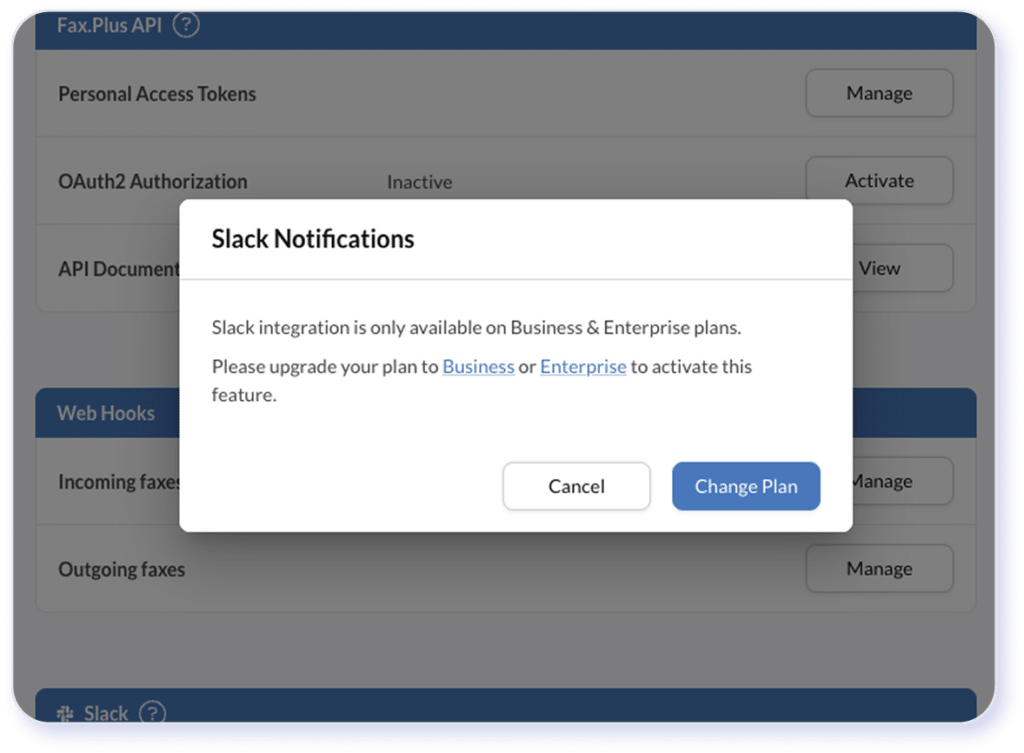
Bottom line: Fax.Plus offers enterprise-level capabilities, with the price tag to match. Research your requirements and verify that they’re available at the price point you expect before signing up.
Is It Easy to Sign Up For Fax.Plus?
Like many modern SaaS platforms, Fax.Plus makes it easy for new users to sign up. You can register with your email or an existing Google, Microsoft, or Apple account.
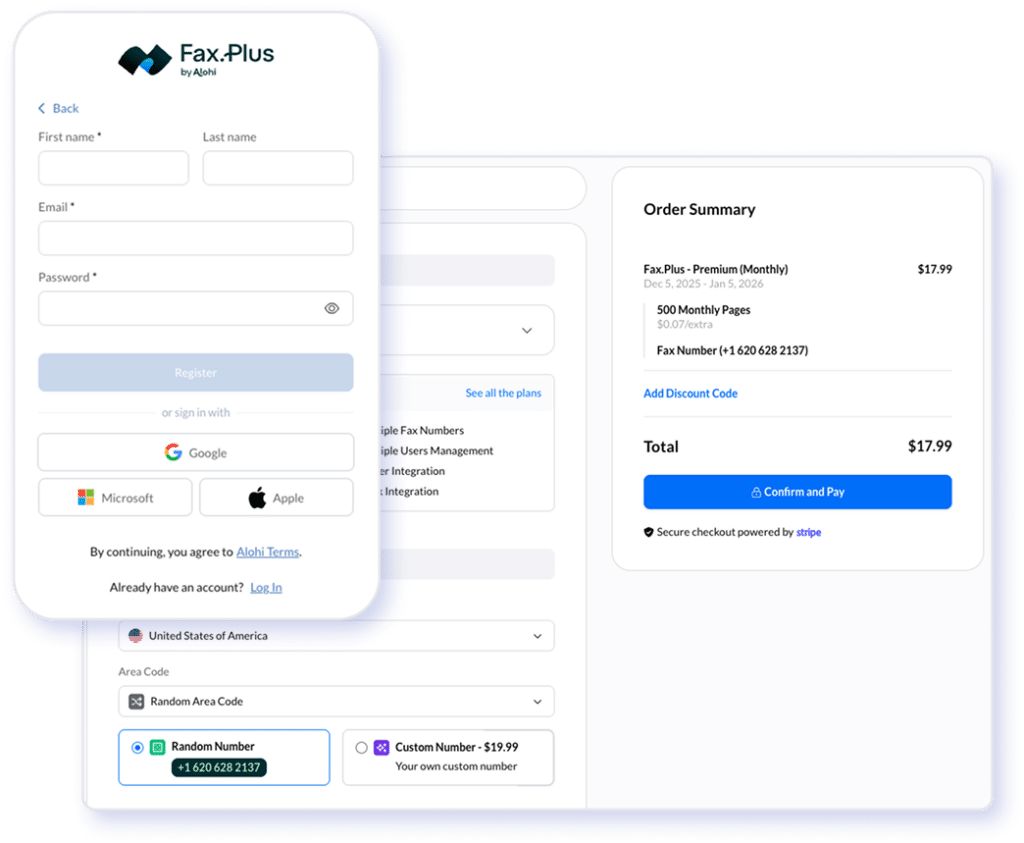
After following up a sign-up link and clicking the Google button, it took just one more click to provide permission, and I was in. I was greeted almost immediately by a pop-up to “get a fax number.” When I followed that link, I was directed to a payment page to select a paid plan (required to receive faxes). You can choose the area code for a randomly-assigned fax number. A custom number costs an extra $19.99.
Security Standards and HIPAA Readiness of Fax.Plus
According to the Fax.Plus website, their plans are compliant with ISO 27001, SOC 2 Type II, GDPR, CCPA, and PCI DSS with these data protection practices:
- Encryption at rest and in transit: Fax.Plus uses AES-256 at rest and TLS 1.2+ to protect data in transit, including email-to-fax.
- Cloud storage: All stored files are encrypted and accessible only after authentication.
- Multi-factor authentication (MFA): Admins and users can enable MFA to increase account-level security.
- Advanced admin controls: Higher-tier plans include features like IP whitelisting, granular access controls, and audit logs.
- Data deletion: Users can permanently delete faxes from the dashboard. These items are purged from encrypted storage after a secure deletion window.
- Data residency options: The Enterprise plan offers the flexibility to store data in specific geographical locations to meet compliance requirements.
Is Fax.Plus HIPAA-Ready?
Only the Enterprise plan appears to be HIPAA-compliant. It includes a Business Associate Agreement (BAA) and offers the audit log for tracking PHI access. It also provides secure fax number management, helping avoid PHI misrouting caused by wrong recipient numbers.
Industry Segments
Where Fax.Plus Holds Up Well
Fax.Plus’ website claims to support healthcare, education, legal services, financial services, IT, and real estate industries. Does the platform live up to its promises?
Based on its capabilities and pricing structure, Fax.Plus may work well for these use cases:
- Small healthcare practices that only need basic HIPAA-compliant faxing and don’t require advanced EMR/EHR integrations.
- Education institutions with light-to-moderate faxing needs and no strict data-handling mandates.
- Legal and real estate firms that primarily need reliable digital faxing without complex multi-party routing or deep system integrations.
- Financial services teams in non-regulated segments, such as mortgage brokers, advisors, and insurance agencies.
- MSPs supporting small businesses that want a low-friction faxing solution without enterprise-level requirements.
Fax.Plus may be suitable for organizations with straightforward faxing needs and less complex workflow requirements. However, larger organizations that require capabilities such as fine-grained permissions, advanced routing, and comprehensive audit logging may find that it does not fully meet their operational requirements.
Bottom line: Enterprises in regulated or data-sensitive industries with large teams, complex compliance requirements, and deep integration needs may require a more advanced solution.
Where May Fax.Plus Fall Short?
While the encryption, access controls, and user management capabilities of the Enterprise plan may meet HIPAA technical requirements, you must configure the software correctly (e.g., enable MFA, logging, and restricted access) to actually achieve compliance. This process often requires high-quality, responsive customer onboarding and support. However, the many user reviews of poor customer service don’t exactly inspire confidence.
Additionally, Fax.Plus has simpler routing rules (e.g., compared to other brands such as eFax Corporate) and may therefore be more prone to PHI mishandling. It offers fewer retention-policy templates to support compliance-grade archival systems and lacks built-in enterprise Data Loss Prevention (DLP) at the email layer.
Fax.Plus Pricing
and Plans Explained
Is Fax.Plus’ Free Fax Plan Worth It?
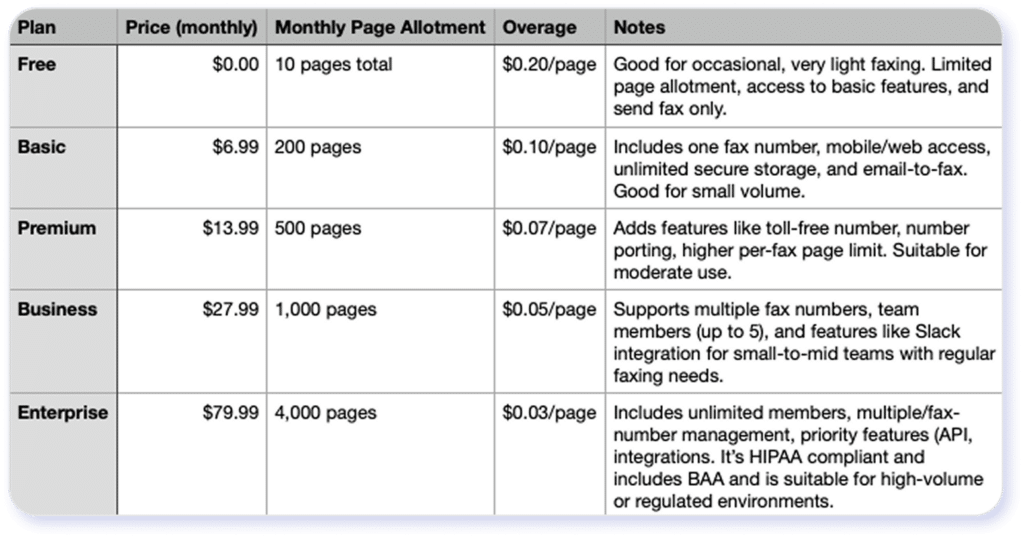
Fax.Plus’ free plan includes 10 pages (send only) that do not reset monthly. If you use up the free pages, you can buy additional credits at $0.20 per page. You have access to basic, limited functionalities, such as uploading a document from your computer or mobile device and faxing it.
While “free” sounds good, this plan may cause more frustrations than it’s worth. For example, you take the time to sign up but hit the 10-page allotment in one or two uses. It’s hard to predict costs once you’ve used up the page allotment, and additional pages may cost more than a low-tier subscription.
What’s more, the plan doesn’t include receiving capacity, making it unsuitable for workflows that require getting faxes back (e.g., signed documents, multi-party exchanges). Without a dedicated fax number for inbound faxing, the plan doesn’t offer a long-term or business-ready solution.
Bottom line: The Fax.Plus free plan can easily become more expensive and less convenient than a lower-tier subscription. It isn’t the way to go for reliability, larger capacity, compliance, or even peace of mind. Most users eventually upgrade or switch to more capable services. As such, it’s better to start on the right foot and select a service that offers the exact features you need.
Key Limitations of Fax.Plus
Based on my first-hand experience, user feedback, and feature gap/performance constraint analysis, here are the top drawbacks to consider:
- Limited file size and format compatibility. Fax.Plus’ file size limit may make it cumbersome for sending large documents, high-resolution scans, or multi-page graphic-heavy files.
- HIPAA-compliant features are only available at the highest plan tier. Lower and mid-tier plans don’t offer the controls you need to achieve HIPAA compliance.
- Less comprehensive admin, routing, and user management features. Fax.Plus’ simplicity may come at the expense of multi-user support, advanced routing, multi-number management, or complex workflows.
- Limited scalability for high-volume or high-frequency faxing. Per-fax size limits can cause inconvenience.
- Poor reputation with customer support. Customer service may come up short if you need help with the software.
All statements in this article were based on information that was publicly available as of July 1, 2026. Consensus is not affiliated with Fax.Plus and all third party trademarks, names, or logos referenced remain the property of their respective owners. Any references by Consensus to third-party trademarks are for identification purposes only and do not imply any endorsement or sponsorship.
eFax: A Reliable Alternative to Fax.Plus
Many companies, especially enterprises and organizations in regulated industries, choose eFax over Fax.Plus for its scalability, flexibility, and advanced features. For example, eFax can handle large files (up to 3 GB) of different formats, including zipped files. You can send heavy documents, high-resolution scans, presentations, or mixed media documents with fewer restrictions.
eFax also provides more advanced send-and-receive capabilities. Plans include secure online storage for inbound/outbound faxes, searchable archives, and robust large-file sharing features for better document management and long-term referenceability. In particular, the OCR technology allows users to search for keywords across all faxed documents and images, which is a big plus.
Bottom line: eFax offers greater reliability for complex, large, and sensitive faxes, including regulated use cases.
Explore The Platform Recognized by leaders, trusted by experts





Frequently Asked Questions
Rest assured, sending a mobile fax or faxing from your mobile phone using the eFax app is a secure process. eFax implements 256-bit AES and Transport Layer Security (TLS) encryption to safeguard all faxes sent and received on your device, ensuring confidentiality and compliance with privacy standards.
Fax servers can be more secure than faxing through a fax machine. Features like encryption, two-factor authentication, and the inability of bad actors to use social engineering to steal login credentials make fax servers a secure option for sending and receiving sensitive documents.
Online faxing, particularly with platforms like eFax, is highly secure as compared to fax machines, be it for sending tax forms or any other confidential documents. eFax employs robust encryption measures to ensure the confidentiality and security of transmitted documents. Furthermore, strict access controls, including two-factor authentication, are in place to limit access to unauthorized users.
Generally, faxing a check is less secure than payment methods like EFT or online payments.
It’s generally secure to send your documents via FedEx faxing. However, choose the self-serve option if available to avoid having a store associate or customer see what you’re sending.
Disclaimer: Statements made in this article are opinions only and based on publicly available information as of 8/7/26. Consensus is not affiliated with Fax.Plus and all Fax.Plus trademarks, names, or logos referenced remain the property of their respective owners. References to these trademarks, names, or logos are for identification purposes only and do not imply any relationship, sponsorship, or endorsement.