IRS Fax Numbers
To Fax Your Tax Forms
Tax-Related Forms
While you can’t fax tax returns to the IRS, you can fax these tax-related documents:

Faxing is a secure and efficient way to send tax forms to the Internal Revenue Service (IRS). While you can’t file your complete tax returns via fax, you can fax other documents related to taxes to the IRS. In some cases, the IRS requires you to use fax for certain information. The IRS fax number you use is crucial and forms have different fax numbers.
This guide will provide a complete list of IRS fax numbers, the types of forms you can fax to the IRS and tips to help you successfully navigate tax season. No one wants to run into issues with taxes. An online fax solution is a secure way to submit tax documents and can help prevent tax filing delays.
What is an IRS Fax Number?
An IRS fax number is a designated phone number that allows you to fax documents to the Internal Revenue Service. Each IRS department or office has a unique fax number used to submit specific forms, supporting documentation and other tax-related paperwork. Due to frequent changes and multiple office locations and departments, finding the correct IRS fax number can be challenging. Check your specific forms and IRS-updated publications to ensure the accuracy of any fax number you send tax documents to.
Can You Fax Your Taxes to the IRS?
Unfortunately, you can’t file your completed tax returns with the IRS using fax services. There are only two ways to file taxes:
- E-filing (filing taxes online)
- Mailing the documents
What Tax Documents Can You Fax?
While you can’t fax tax returns to the IRS, you can fax these tax-related documents:
Form SS-4
The SS-4 form is an application for an employer identification number (EIN). Employees usually use their Social Security number when filing taxes, but if you have employees or operate a corporation, you’ll need to apply for an EIN with this form.
Form 8821
This document allows the IRS to share confidential tax information with a person or organization of your choosing. You can also use this form to revoke any previous tax information authorizations.
Form 2848
This form allows someone to represent you before the IRS. It lets you designate a power of attorney or declare a formal tax representative.
How to File Tax Forms With the IRS
How to Fax Tax Forms
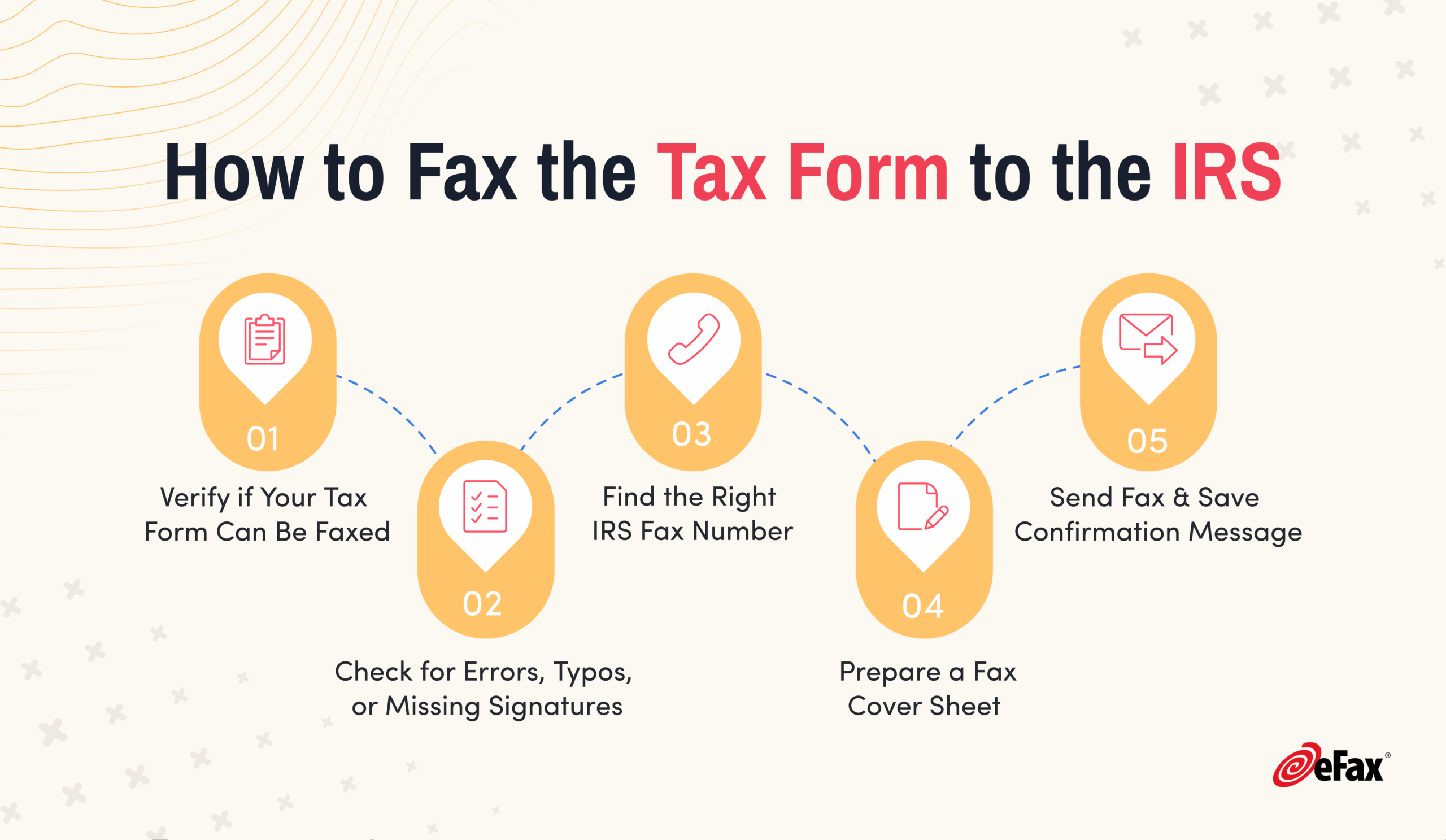
Remember, you can’t submit a tax return to the IRS via fax. But you can fax some documents in specific situations. To fax tax forms:
-

Determine if your tax form is eligible for faxing. See the list below for eligible tax forms.
-
Ensure the information on the form is accurate and complete. Make a copy of the form to keep for your records.
-
Identify the correct IRS fax number for your form – the IRS uses different fax numbers for various forms.
-
Prepare your forms with a cover sheet that includes your name and contact info, the date, how many pages you’re sending and a description of the documents.
-
Send your fax using an online fax service like secure eFax® or a traditional fax machine. Make sure you receive a fax confirmation.


Key Reasons Why to Fax Your Tax Forms
While you can only fax certain forms to the IRS, you can fax these documents to other people, using eFax®.
Suppose you hire a tax professional to help you file your taxes this year. You can fax your documents to them to avoid any delays.
That might not include faxing the 1040 form since the tax professional can fill that out for you. But you can still fax these documents:
- Any W-2 or 1099 forms you received
- Social Security number or verification documents
- Any receipts that could help you get tax deductions (like for charitable donations or work-related purchases)
- Credit card and bank statements
- Any business financial statements for business owners
Online fax can save you time and provide a much-needed paper trail for your documents.

Common Issues When Faxing to the IRS and How to Solve Them
Sending too many pages
Your fax may not go through if you’re trying to send many documents. Instead, try using a digital fax service like eFax to send large files without hassle.
Line down
Sometimes, even the IRS fax number has issues. Try sending your fax via a digital fax service that tracks your sent faxes and tells you when they’ve been received successfully.

Submit IRS Forms Instantly & Securely with eFax®
With eFax®, you can fax your IRS forms securely and instantly. eFax employs encrypted transmissions, gives you instant fax confirmations and offers 24/7 customer service to support you. Here are some of the reasons why eFax® is a preferred choice for faxing tax documents:
-
Efficiency
Easily send a fax from your mobile device or laptop with only an internet connection required.
-
Delivery confirmation
You’ll get a confirmation that your fax was successfully delivered.
-
Security
Faxes are encrypted with TLS, 256-bit AES encryption and SSL.
-
File compatibility
eFax® Personal and eFax® for Business are compatible with multiple file types, including PDF, PNG, JPG, DOC, and more.
-
Fast and Simple
Only a few simple steps are between you and delivered faxes – no more waiting for physical fax machines or busy signals.


FAQs about IRS Fax Forms & Numbers
You can electronically file tax returns and specific forms to the IRS through approved software or the Free File program. If paper filing, mail to the address in your form instructions or fax documents and forms according to IRS guidelines. If you fax your documents with eFax®, you should receive delivery confirmation in a few minutes.
You can only fax certain documents to the IRS, specifically when under audit or at the request of an IRS agent, for missing items from your tax return.
To send a fax to the IRS, you can use an online fax service like eFax® or a traditional fax machine. Obtain the IRS fax number to send documents for the IRS department or office you need to reach, attach your documents — including cover sheets or reference numbers — and follow the instructions provided by your chosen fax method.
The IRS does not accept complete tax returns via fax. However, there are some forms and documents that the IRS either allows or requires to be submitted via fax, such as:
- Form 8962, Premium Tax Credit (PTC), is related to the Affordable Care Act and may be faxed, but only when you get a notice from the IRS.This wil come in the form of Letter 12C and should provide the appropriate fax number: 855-204-5020.
- Form SS-4, Application for an Employer Identification Number (EIN). If your principal business, office, or legal residence is within one of the 50 states or the District of Columbia, fax the IRS at 855-641-6935. However, if you do not have a legal residence, principal place of business, or primary office in any state, you can fax the IRS at 855-215-1627 if you are within the US, or at 304-707-9471 if you are outside the US.
- Form 8821, Tax Information Authorization, permits the IRS to share confidential tax information with a person or organization of your choosing. You can also use this form to revoke any previous tax information authorizations, and it may be faxed to the appropriate IRS department based on your location.
- Form 2848, Power of Attorney and Declaration of Representative, enables another person or entity to represent you before the IRS, and may be faxed to the appropriate IRS department based on your location.
If you are a victim of tax-related identity theft, the IRS may require certain identity theft-related documents to be faxed for verification purposes. And in some cases, the IRS may request additional information or documentation in response to a notice, and you may be allowed to fax the required documents.
The fax number for form 8962, the Premium Tax Credit (PTC), varies depending on the region or specific IRS office handling your case. Check the irs.gov, see your Letter 12C instructions or contact the IRS by phone at 800-829-1040 for the accurate and up-to-date fax number.
It depends. The IRS send hundreds of different types of notice. Whether you can fax a response can depend on the nature of the notice. Look on the form under the “What you need to do” section it will tell you how you need to respond. If this notice requires a fax response, or faxes are accepted, the correct IRS fax number will be listed.
Faxing tax documents can be safer than paper faxing if proper precautions are taken. First, use secure and reputable fax services with encryption features. Then, double-check the recipient’s fax number to avoid sending sensitive information to the wrong number. Finally, confirm receipt with the IRS to ensure successful transmission.
eFax® is secure, using 256-bit AES and Transport Layer Security (TLS) encryption, the highest levels of encryption and the same ones that banks and military services use for confidential information. Whether you are sending personal faxes or using eFax for business, you can be confident you’re getting secure document delivery.