
last updated Updated
October 16, 2026
12 min read

Send and receive faxes in minutes.
Disclaimer: Statements made in this article are opinions*
FaxBurner — A Quick Overview
According to FaxBurner’s official marketing materials, the platform was founded in 2010 and has since served over 1 million users. The company positions its online fax service as a modern replacement for traditional fax lines and hardware, claiming to allow users to send and receive faxes via an iPhone app or email. Based on promotional descriptions, the service is primarily marketed toward individuals and small businesses handling occasional or low-volume faxing.
FaxBurner claims that, unlike many of its competitors, it allows users to receive inbound faxes entirely for free by generating a temporary fax number. According to their website, this free plan offers a completely no-cost way to manage light fax workflows, with all received documents automatically stored in the cloud for easy access.
Next, let’s look at what current users have to say about their experiences with FaxBurner.
Customer Reviews: What Users Really Think About FaxBurner
Although FaxBurner has been around for 15 years, earning the website a favorable trust-and-security evaluation, online user reviews are thin. For example, it has a company profile on G2 but no reviews, and does not have a page on Capterra.
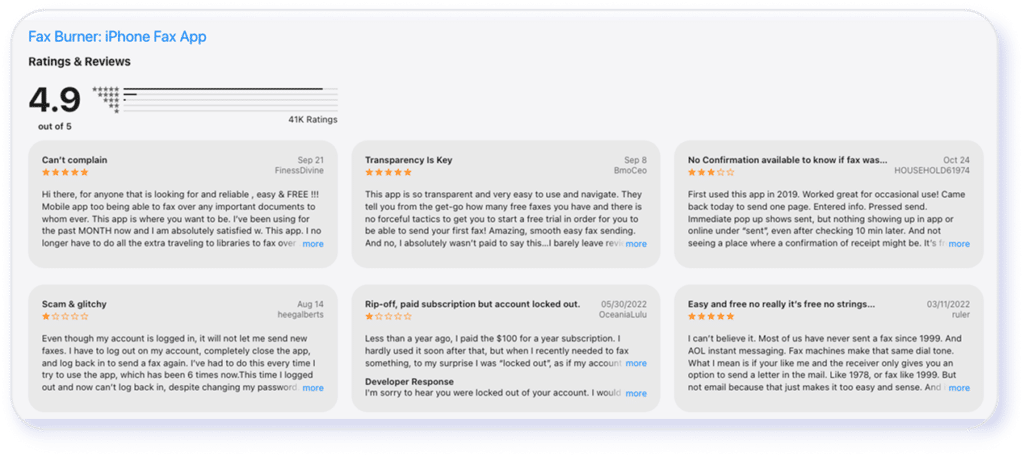
With a “mobile first” approach that primarily sends and receives lightweight faxes via its mobile app, FaxBurner does have thousands of reviews on the Apple App Store. However, there’s no active listing on the Google Play Store for Android phones. Here’s what real-world users like and dislike about the iPhone app:
FaxBurner Reviews
Apple App Store 4.9/5 stars
(41k reviews)
FaxBurner Features Breakdown
Selecting a fax solution means ensuring the features indeed meet your needs. For example, can the software handle specific file types? What are its search and archiving capabilities? Are the security functions you need available to the plan you choose?
I signed up for FaxBurner’s free plan and tested the app. FaxBurner’s features are rather barebones. They’re pared down to the basics for a simple user experience tailored to occasional individual users:
International Faxing
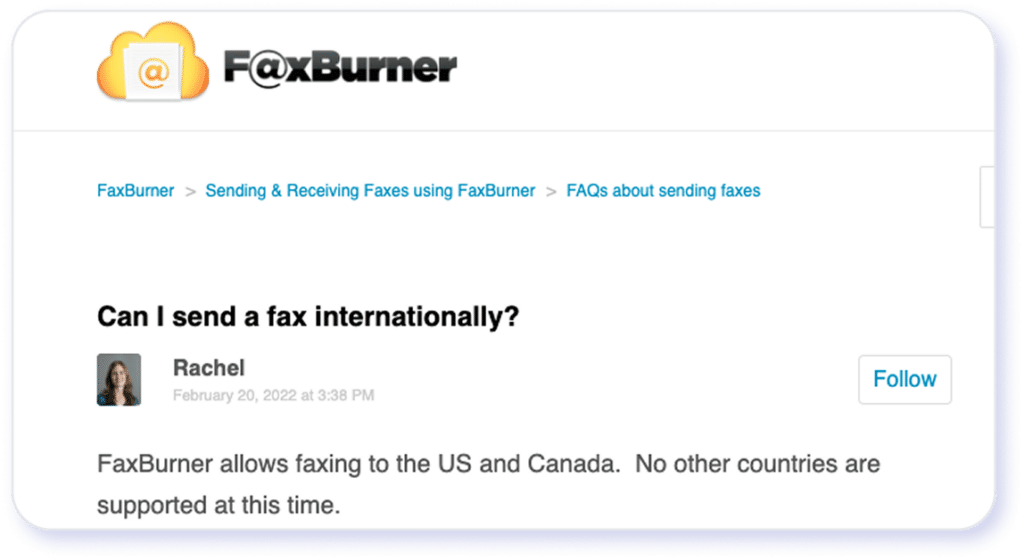
The fax number you receive allows you to receive faxes from anywhere, there’s no geographic restriction on incoming faxes. However, you can only send faxes to US and Canadian numbers. FaxBurner does not support International outbound faxing.
File Size and Formats
According to FaxBurner’s marketing materials, you can attach files up to 25MB when sending a fax via email (compared to eFax’s 3GB), and the software only accepts PDF, TIF, and JPG files. You have to split larger files and send them separately. These limitations can become inconvenient for business users handling large files of various formats, such as high-resolution images, presentations, or large PDFs.
Mobile/web Experience
FaxBurner highlights its “mobile-first” philosophy. While its iPhone and iPad app works well, enabling users to send and receive faxes directly from their devices with minimal steps, I was unable to find a currently active, official Google Play listing for “FaxBurner” at the time of writing. One third-party SPK site has a “Fax Burner – Get & Send Faxes” Android app (last updated 2020), but using an unverified, outdated app may pose compatibility and security risks.
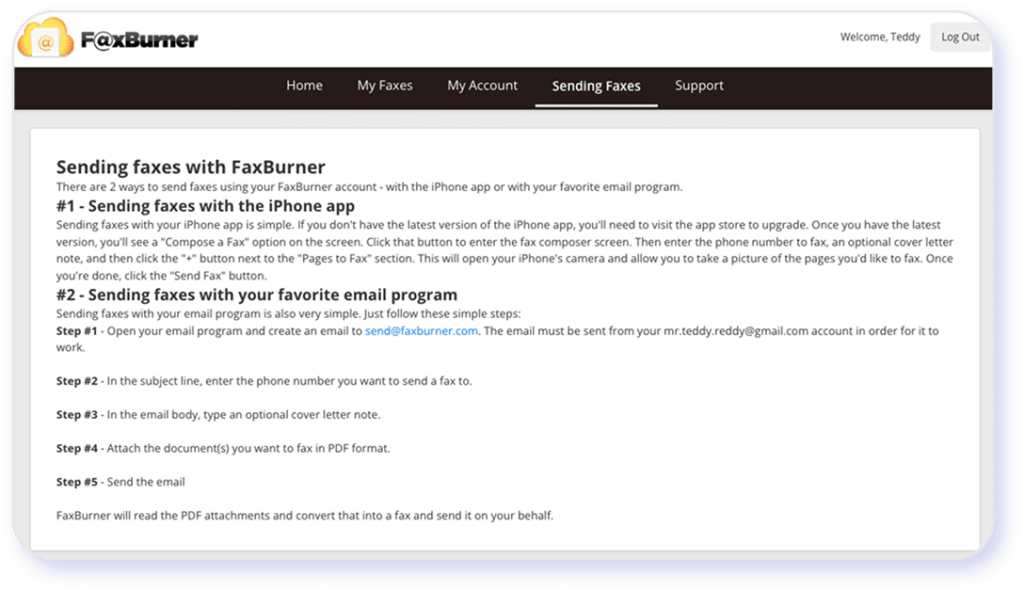
What about sending faxes via desktop? FaxBurner doesn’t offer a dedicated desktop software. When I click on the “sending fax” tab on the website, the page provides instructions for a workaround to fax via email:
Integrations and Cloud Storage
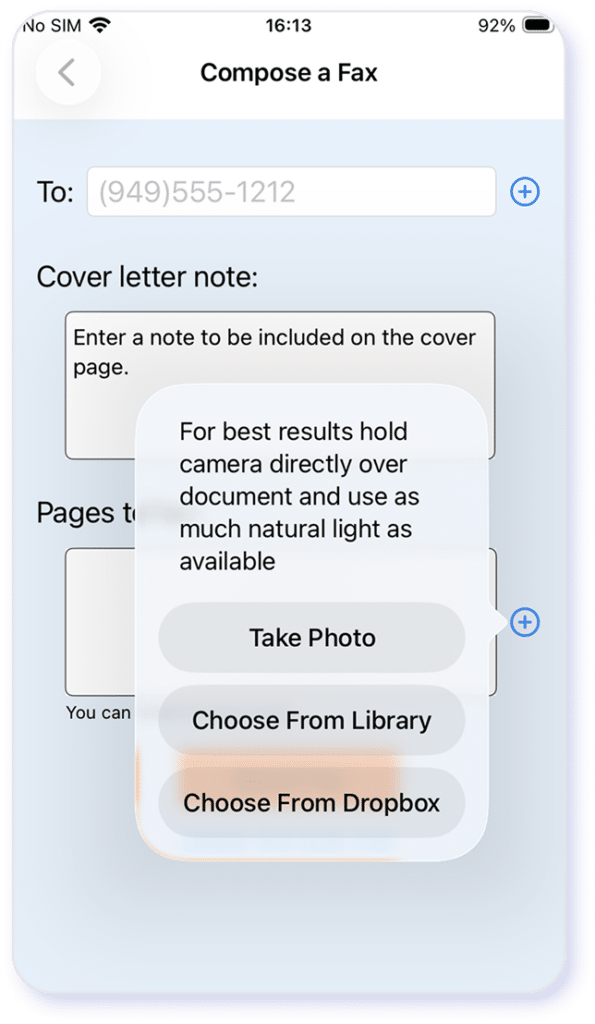
You can send a file stored on Dropbox via the FaxBurner mobile app. However, the platform doesn’t support advanced integrations beyond a basic “cloud storage + mobile app” workflow. I can’t find any native integration with platforms like Slack or Zapier. Additionally, FaxBurner’s website or FAQ doesn’t mention automation with external apps beyond email-to-fax and Dropbox.
e-Signature
You can receive and upload a document, sign it with the FaxBurner mobile app, and fax it, eliminating the process of printing, signing on paper, scanning, and faxing. This feature is convenient and often sufficient for casual use, occasional forms, simple agreements, and other low-complexity tasks.
However, FaxBurner doesn’t claim compliance with regulatory frameworks such as HIPAA. It doesn’t provide audit trails, signature history, compliance reporting, or enterprise-grade advanced document workflows. As such, the e-signature feature may not be ideal for business-grade use cases.
Customer Support
Obtaining customer support through the platform proves difficult, as users must navigate an indirect and cumbersome process.. There’s no live chat or contact page on the website. There’s a link to “create a support ticket” in the Support tab. However, I could not find a way to submit a ticket after following the instructions to the Account Options page.
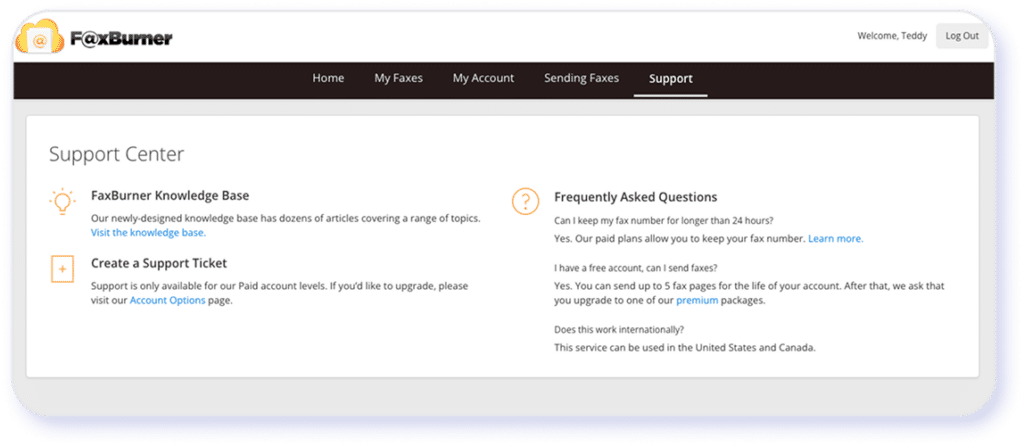
I also tried using the “Help Center” link on the mobile app. It opens a support page (hosted on Zendesk) that, unfortunately, isn’t optimized for a mobile experience and doesn’t offer a way to contact support for further assistance. The absence of real-time live support may be tolerable for free-plan users, but it falls short of the service standards expected by paying enterprise customers.
Bottom Line
FaxBurner’s barebones features make it an easy-to-use tool for casual and occasional users who need to sign and send simple forms and small documents. However, its lack of international faxing, limitations on file size and types, lack of a robust desktop interface and integration capabilities, and limited customer support are not sufficient for business use cases that require reliable faxing.
Is It Easy to Sign Up For FaxBurner?
The FaxBurner account creation process is straightforward, requiring minimal information to access the platform’s free tier. It took one step to enter my email and set up a password, and I could start using the free plan. However, the platform doesn’t offer sign-in with Google or Microsoft accounts, a convenience that many modern SaaS users have come to expect. After signing in, you can get a free, temporary fax number, valid for 24 hours, to start receiving faxes. You can also get a permanent fax number by upgrading to a paid plan.
Security Standards and HIPAA Readiness of FaxBurner
Many industries use faxes to transmit sensitive information. Does FaxBurner offer the necessary controls to protect your data and help you comply with regulatory requirements?
- Business Associate Agreement (BAA). FaxBurner does not position its software as HIPAA-ready. Its FAQ explicitly states it is not intended for the transmission of Personal Health Information (PHI).
- Encryption in transit. FaxBurner’s public materials (e.g., blog posts) refer to standard SSL/TLS protection. However, the company has not published specifics about its protocols and certificates.
- Encryption at rest and key management. FaxBurner does not appear to offer clear public documentation on whether stored faxes are encrypted at rest or how keys are managed.
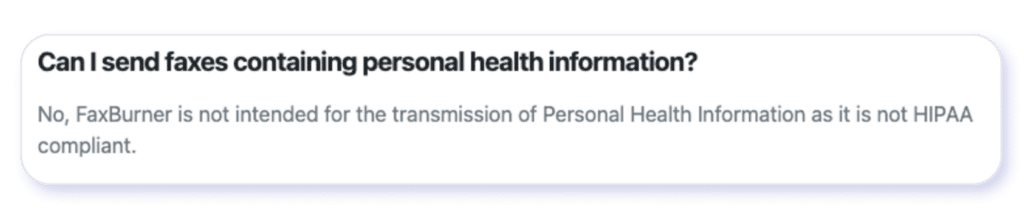
- Compliance certifications (e.g., SOC, HITRUST, PCI, etc.). FaxBurner has not published any attestations for SOC, HITRUST, or PCI or independent audit results.
- Access controls, audit trails, and admin controls. FaxBurner’s public documentation does not mention enterprise-grade admin controls, fine-grained permissions, or comprehensive audit logging required by HIPAA auditing.
- Data residency and retention policy. According to FaxBurner’s website, the company states it stores sent and received faxes in user accounts. However, it doesn’t provide explicit documentation about data-residency options (geographic storage), retention controls, or ePHI deletion workflows required for HIPAA compliance.
- Third-party integrations and secure workflows. There’s no documentation on secure integration frameworks (e.g., SCIM, SSO with enterprise IdP, secure APIs with role controls) required by healthcare organizations.
The verdict: FaxBurner does not appear to be HIPAA-ready. It lacks the documented controls and contractual assurances (e.g., BAA, audited compliance, secure key management, and enterprise admin/audit features) required by healthcare organizations. Specific details regarding encryption are lacking or unclear so users who want to use the service for faxing sensitive information should proceed with caution.
Industry Segments
Where FaxBurner May Hold Up Well
FaxBurner’s lightweight feature set and mobile-focused workflow may be a solution for individuals and businesses that need occasional, convenience-based faxing rather than enterprise-level compliance or heavy integrations.
Industries Where FaxBurner is a Practical Fit
FaxBurner may work well for freelancers and solopreneurs in non-regulated industries who send a few faxes (e.g., contracts, forms) a month. It may also be a solution for small local service providers (e.g., insurance agents, real estate offices, consultants, home services, contractors) that only fax sporadically and don’t need a permanent fax number.
Meanwhile, its mobile-first approach may enable professionals in real estate and property management to handle applications, lease addenda, HOA forms, and agent-to-agent paperwork that don’t contain sensitive personal or financial data while in the field.
Gig economy and on-the-go workers, such as drivers, field technicians, inspectors, and mobile workers, may find FaxBurner helpful for sending documents directly from their iPhones. The app also may be a fit for students to handle simple documents, such as transcript requests and administrative forms.
Finally, remote workers who need one-off, easy-to-use fax capabilities could use FaxBurner without paying for a premium corporate solution, assuming they don’t transmit sensitive personal, healthcare, or financial data.
Industries Where FaxBurner Falls Short
FaxBurner’s solutions may not be suitable for organizations seeking to integrate faxing into their digital workflows, nor for those in regulated industries handling sensitive personal, health, and financial data. These include:
- Healthcare industry or vendors handling HIPAA-regulated information. FaxBurner does not appear to offer HIPAA compliance or a BAA.
- Finance, lending, and banking sectors. FaxBurner products may lack enterprise-grade encryption, secure integrations, and auditable controls.
- Legal firms handling confidential client records. FaxBurner does not appear to offer advanced security features, access controls, or audit trails.
- Government and public sector. FaxBurner’s solutions may lack compliance certifications or data-retention governance mechanisms.
- Enterprises with workflow automation requirements. FaxBurner does not appear to support deep integrations, APIs, or identity and access management (IAM).
FaxBurner Pricing and Plans Explained*
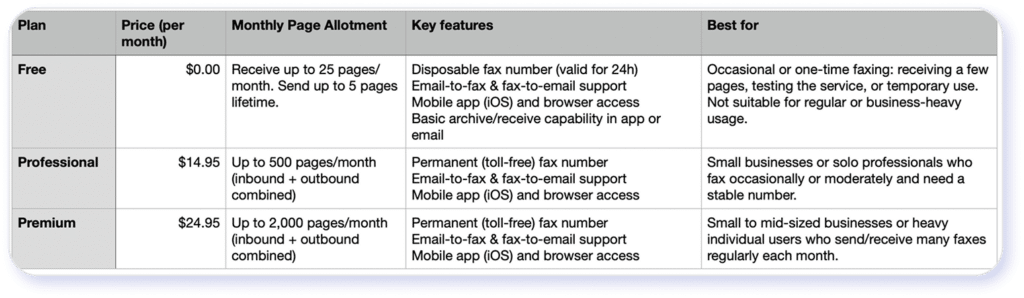
*Pricing and plans listed above are for informational purposes based on FaxBurner’s as of 8/7/26 date and may not reflect the most current rates. Confirm with FaxBurner directly for the most up-to-date pricing.
FaxBurner’s website does not contain public documentation on how it handles overages. A support article says that the entire fax will be rejected if it puts you over the monthly allotment. There’s no indication that you can purchase additional pages. You must wait for your quota to reset in the next billing cycle or upgrade to a higher-tier plan.
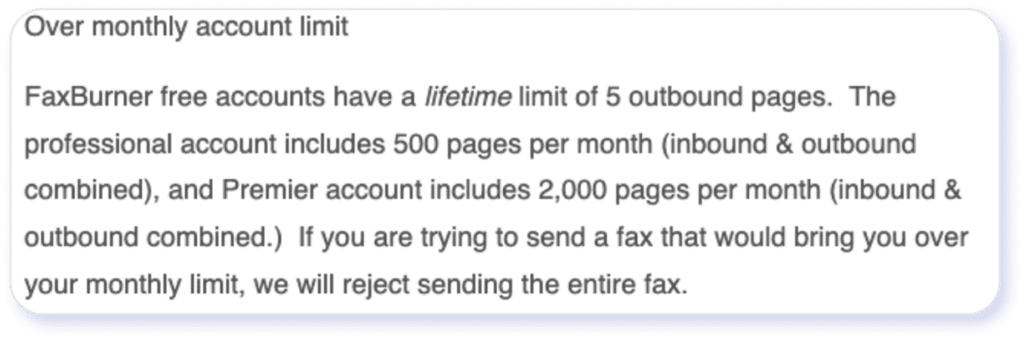
While this “quota limit” model gives you control over costs, it limits flexibility. You must track usage carefully to avoid blocked faxes. This limitation can be a drawback for users with unpredictable or bursty fax volume.
Is FaxBurner’s Free Fax Plan Worth It?
FaxBurner’s website notes that the free plan includes a fax number that is valid for only 24 hours. After that, you have to generate a new one. You can receive up to 25 pages each month, but sending is capped at 5 total pages for the lifetime of your free account (about 1–3 multi-page faxes). To send more, you’ll need to upgrade to a paid plan. Users can send and receive faxes via email or use the mobile app to manage faxes. The free plan also includes e-signing, scanning/attaching from phone, and cloud storage. However, there’s no publicly available information on how much data you can store or data retention controls.
Here are the key restrictions to consider:
- Cover-page branding. Faxes sent via the free plan include FaxBurner branding.
- Small outbound limit. You can send only five pages over the lifetime of your account.
- Temporary fax number. You can’t use it as your contact information or to support long-term fax workflow.
- Low inbound volume. The number of pages (25 per month) is insufficient for regular use. Paired with the temporary fax number that is only valid for 24 hours, this makes the free plan quite inconvenient and even less suitable for regular use.
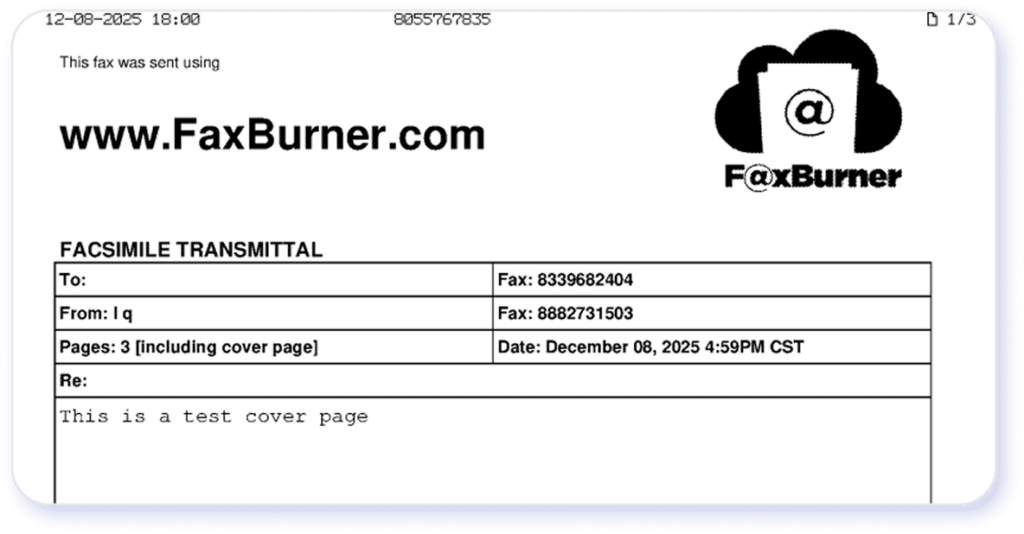
These limits make the free plan unsuitable for regular business workflows, meeting consistent fax needs, or handling multi-page documents. As such, most users eventually upgrade to paid plans or switch to other fax solutions to send and receive more pages, get a permanent fax number, remove FaxBurner branding for a professional look, access more robust features, integrate faxing with digital workflows, or achieve regulatory compliance. Overall, the free plan should be treated more like a temporary trial than a long-term free service for regular fax users.
Key Limitations of FaxBurner
Based on my first-hand experience, user feedback, and feature gap/performance constraint analysis, here are the top drawbacks to consider:
- Not HIPAA-ready and no BAA offered. FaxBurner doesn’t have the audit controls required by healthcare organizations for regulatory compliance.
- Limited security and enterprise controls. The company offers limited information on encryption, key management, admin roles, and audit trails.
- Restricted international faxing. FaxBurner can only send to U.S. and Canadian numbers.
- Lack of integration and automation support. The software doesn’t offer API, Zapier, Slack, or Microsoft integration to help streamline workflows.
- No clear storage guarantees. The platform doesn’t specify formal storage quotas, retention policy, or export/archival controls.
- Poor image and graphic fidelity. Photographic or graphics-heavy pages show significant degradation in quality.
- No overage flexibility. You can’t purchase additional pages if you go over your monthly quota.
- Limited multi-user or enterprise features. FaxBurner lacks multi-user management for teams.
- Unclear Android app availability. The FaxBurner app is not available on the Google Play Store at the time of writing.
Bottom line: FaxBurner may be a no/low-cost solution for individuals or small businesses who don’t require regular fax usage. However, various limitations make it less suitable for heavy or sensitive use cases.
eFax®: A Reliable Alternative to FaxBurner
For companies seeking scalability, flexibility, security, and advanced features, eFax is an obvious alternative to FaxBurner. Enterprises rely on eFax to deliver the highest fax quality with sharp image and graphic reproduction that rivals the highest-end fax machines.
eFax reviews on trusted third-party sites:
Trustpilot: 4.4/5 stars
(2,289 reviews)
G2: 4.4/5 stars
(148 reviews)
Capterra: 4.0/5 stars
(70 reviews)
eFax also provides enterprise-grade security, using 256‑bit AES encryption and TLS to protect data in transit and at rest. eFax Protect and eFax Corporate maintain audit trails and logs while offering features to support compliance with HIPAA, GLBA, SOX, PCI, and more. Additionally, eFax can transmit files up to 3GB and handle various file formats (e.g., PDFs, JPGs, Office documents, zipped files, etc.), making it easy to send complex or mixed-content documents.
eFax Protect and eFax Corporate offer security and reliability for regulated industry use cases:
- Government
- Healthcare
- Banking and finance
- Legal
- Manufacturing
eFax offers higher quotas, large‑file support, and secure storage infrastructure for businesses with high fax volume. It provides a full-function web portal, iPhone and Android mobile apps, and the ability to send and receive faxes via email. Moreover, granular admin and access permission controls meet the needs of large organizations. Enterprises rely on eFax to handle complex, large, and sensitive faxes, including regulated use cases.
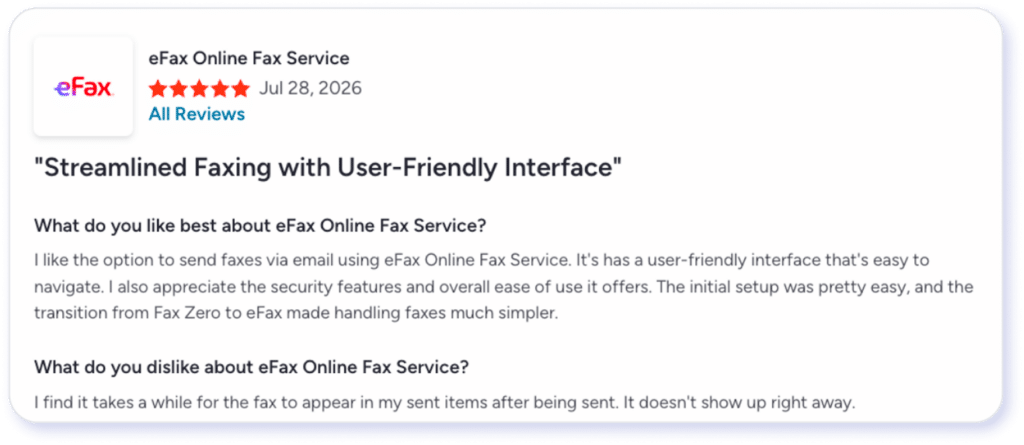
Join over 11 million businesses worldwide who rely on eFax for secure, fast, and modern online faxing.
Switch to eFaxRecognized by leaders, trusted by experts





Frequently Asked Questions
FaxBurner offers an iPhone app for sending and receiving faxes on iOS devices. However, no FaxBurner listing is found on the Google Play Store at the time of writing. You can work around this limitation by receiving a fax via email on an Android phone.
The free FaxBurner number is temporary and valid for 24 hours. If you want to continue receiving faxes at a permanent number, you must upgrade to a paid plan.
You can send PDFs, TIFs, and JPGs as email attachments or use the mobile app to take pictures of a document. However, you cannot send native Microsoft Office documents like .doc, .docx, .xls, .xlsx, .ppt, or .pptx. You must take an additional step to convert these files into a PDF, TIF, or JPG.
FaxBurner claims to encrypt faxes in transit. However, documentation is thin, and the solution doesn’t have advanced security features to protect sensitive health, personal, or financial data.
Yes. You can attach multiple PDF, TIF, or JPG files and send them in a single fax, though total page limits still apply based on your plan.
Disclaimer: Statements made in this article are opinions only and based on publicly available information as of 8/7/26. Consensus is not affiliated with FaxBurner and all FaxBurner trademarks, names, or logos referenced remain the property of their respective owners. References to these trademarks, names, or logos are for identification purposes only and do not imply any relationship, sponsorship, or endorsement.
eFax is a registered trademark of Consensus Cloud Solutions, LLC.