
last updated Updated
October 16, 2026
14 min read

Send and receive faxes in minutes.
Disclaimer: Statements made in this article are opinions*
iFax — Quick Overview
According to iFax’s official marketing materials, the platform operates as an online service designed to turn a computer or mobile device into a personal digital fax machine. The company claims that its service allows users to send faxes entirely online without the need for a traditional phone line or physical hardware. Based on promotional descriptions, the platform is structured specifically for users who do not require a dedicated machine due to low transmission volumes, or who seek greater flexibility regarding formatting and transmission compatibility.
iFax claims to have accumulated over 5 million users and reports having processed more than 20 million faxes through its application. Regarding its mobile infrastructure, the company notes that it launched its first application on the App Store in 2008, positioning itself as an early adopter of mobile faxing capabilities.
iFax currently has a 4.8 user rating on Capterra, and many users mention its ease of use. It also has the HIPAA Seal of Compliance.
Customer Reviews: What Users Really Think About iFax
Capterra reviewers highlight how easy iFax is to use, as well as the ability to try it out for a few days for free. Reviewers believe it’s a good option for people who need to send an occasional fax, noting that fax quality is good. Additionally, for some users, the free trial didn’t require a credit card, which is a plus for those who don’t want to put their details online just yet.
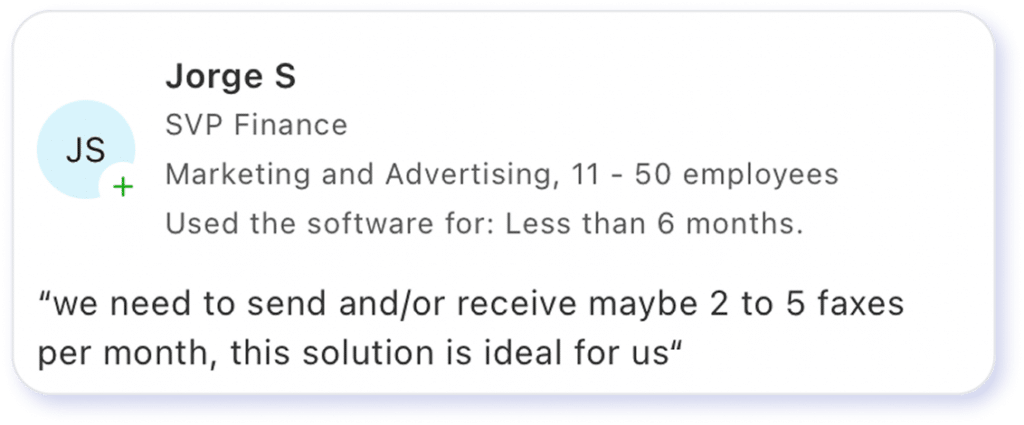
Trustpilot sees slightly lower ratings, averaging 2.7. However, it’s interesting to note that reviewers seem to really love or really hate the platform. 60% of reviewers left five stars, and 29% left just one star. Ratings in the middle were in the single digits. To me, this suggests that the platform may be a good option for a specific type of user, which we’ll unpack in the next few sections.
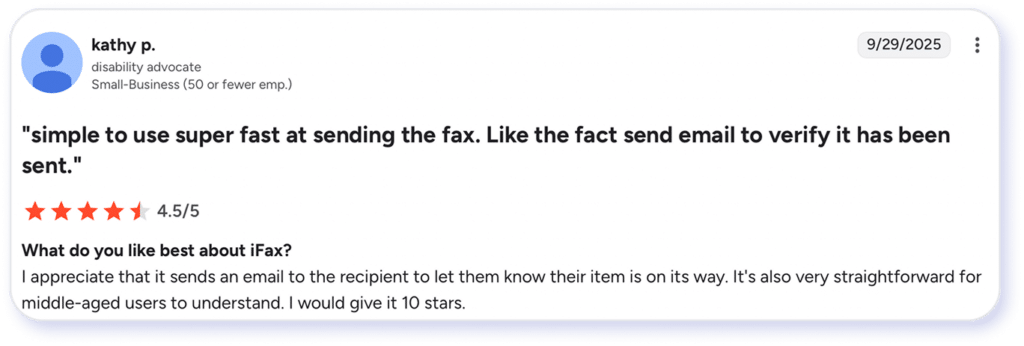
G2 also shows good reviews with users specifically mentioning how easy it is to use and that “fax received” notifications were extremely clear.
Some of the biggest complaints lie in the terms of the free trial. It was difficult to sort out what was happening with the trial, with some users claiming that it didn’t require a card and others claiming that it charged them immediately and wouldn’t offer a refund. I didn’t take advantage of the free trial, but I would caution all users to read the fine print on free-trial terms and pay close attention to what they’ve agreed to.
Users signing up for the free trial through Google Play may also have trouble cancelling before the trial ends, per reviews on the Google Play Store. The company repeatedly states that Google handles purchases through its app, so exercise caution when using the trial on a mobile device.
Source: G2
iFax Features Breakdown
According to the iFax website, the company offers a modern, cloud-based faxing experience designed for users who want flexibility across devices and straightforward digital workflows. I had the opportunity to test it out, and before we get into the details of iFax’s workflow, here are a few of my first impressions.
Mobile and Web Faxing Experience
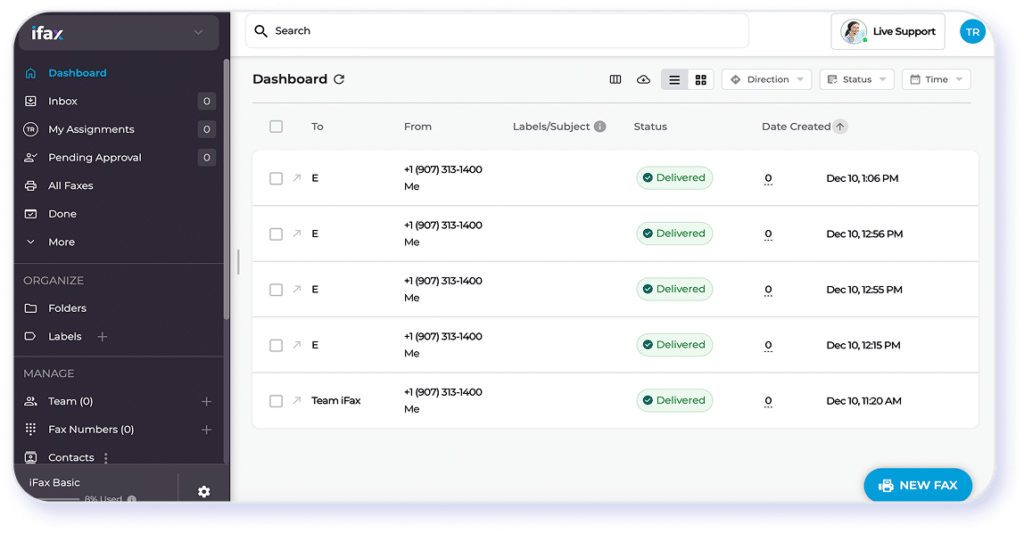
iFax has an intuitive interface across its mobile app and web platform. Users can send and receive faxes from multiple devices, making it accessible for individuals or small teams that prioritize mobility. The UI is uninspiring, but ultimately, everything was easy to find. While the core experience is easy to navigate, organizations with heavier or more specialized faxing needs may look for platforms that offer broader customization or more advanced automation capabilities.
Supported File Formats
The service supports common document types, including PDFs, Word files, and image formats. I was able to upload documents from a desktop or mobile device, simplifying document handling. However, complex document bundles may require a higher subscription or additional capabilities beyond what I was able to test.
Cloud Storage & Document Access
iFax integrates with popular cloud storage tools, enabling users to import documents from platforms such as Google Drive or Dropbox. This is useful for routine file access and organization. It uses 258-bit AES encryption for every fax sent and received and claims to befully compliant with HIPAA and GLBA regulations. Again, it’s a convenient set of capabilities that may appeal to a range of user types. I had no trouble accomplishing what I wanted using these capabilities.
E-Signatures & Document Annotation
The platform includes built-in tools for adding signatures, notes, or markups before sending a fax. These features help streamline simple approval workflows and may be suited for users who need lightweight document editing. However, this functionality is restricted to premium subscription tiers, preventing testing during my baseline evaluation.
Fax Quality
iFax sends fair quality faxes, depending on the chosen specs. Each quality tier requires a different number of credits, so users can decide how to balance their budget with transmission results.
Workflow Integrations
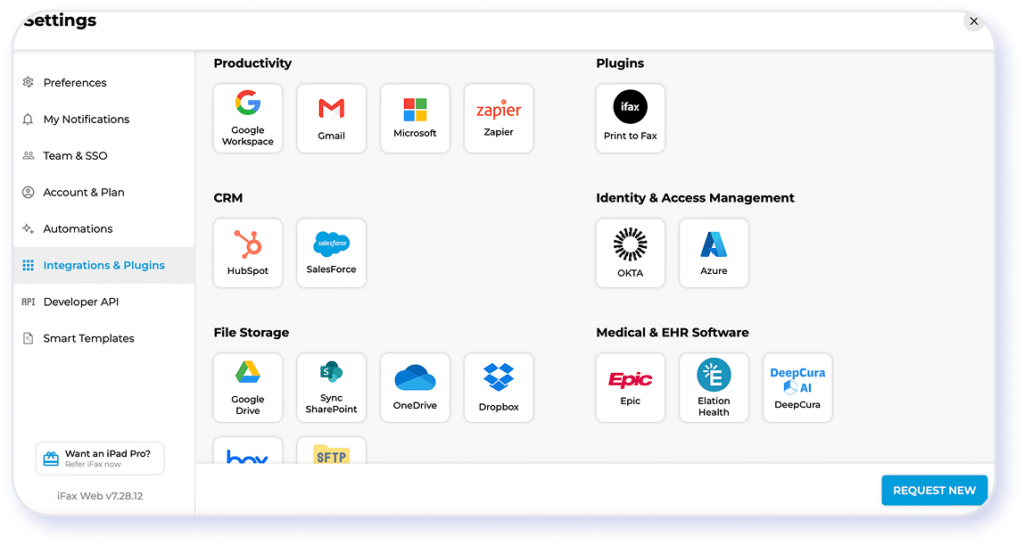
iFax offers integrations that cover the basics: cloud imports, email-to-fax capabilities, and API options for light automation. This may support streamlined workflows for many small and mid-sized users. Teams with more complex organizational requirements may need to upgrade subscriptions and look a little more closely at how to customize iFax’s features.
iFax’s Fax Quality and Performance Reviewed
What does iFax look like in real life? Let’s go through the process of signing up and sending a fax.
Signing Up for a Free iFax
The sign-up process wasn’t as straightforward as I would have liked.
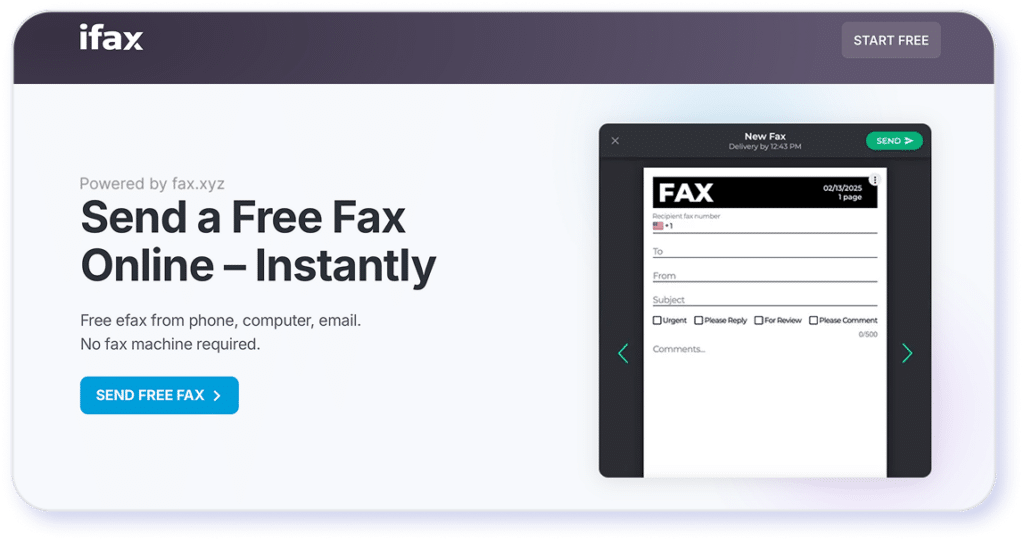
The sign-up page mentions sending a free fax multiple times. It suggested to me that I could test out the service without much fuss. That wasn’t quite what I found.
Clicking “send free fax” opens a pop-up window. I entered my information and selected a test fax. From there, it gave me no indication that anything was happening, only that the estimated delivery time was about 5 minutes. After a few minutes, I clicked “send” again, and the same thing happened. No indication that the fax was sending.
Fast-forward a few minutes, and the estimated time keeps moving forward by a few minutes. I clicked “send” for a final time, and another pop-up window appeared asking for my credit card information. To proceed with the free fax, you’ll need to enter your details and payment information and create an account. This isn’t an easy first start for someone who just wants to try things out.
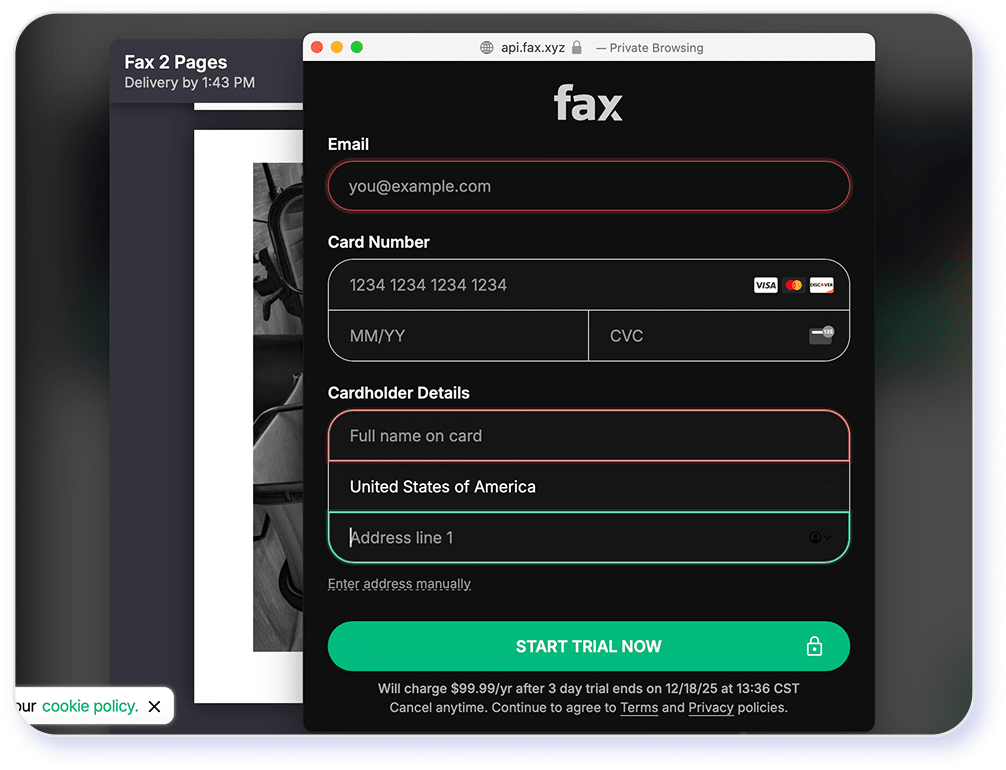
It automatically detected that I was sending a landscape-oriented fax, which was a plus.
I would give this two out of five stars because it was a little frustrating.
Looking at the iFax Dashboard
Signing up for an account was fairly straightforward. The dashboard seems simple on the surface. As I was clicking through customizations and automations, I noticed there are many features I don’t have access to on the lowest pricing tier. That’s disappointing.
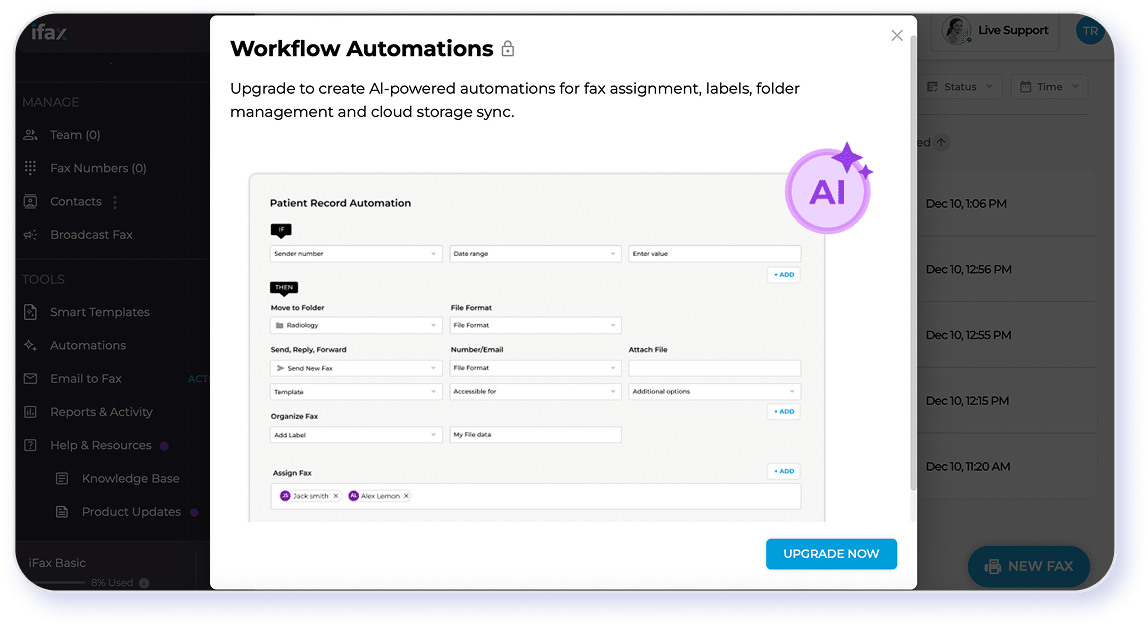
What I like:
It gives me the option to set up contacts, manage a team, and access essential features right on the left side of the dashboard—including templates. The UI feels like common productivity software like Slack or Teams, which makes it feel very familiar as I get used to navigating it.
What I don’t:
The UI is certainly functional, but it focuses heavily on a widget space in the middle. Once you click out of the unusable widgets, the dashboard reverts to simply a list of previous faxes. Functional, but certainly not pretty.
Sending Faxes
Sending a fax is straightforward. There’s a “new fax” button at the bottom right. That’s it. Simple and elegant.
As I mentioned previously, you need to re-select HIPAA compliance at the beginning of each new fax if you require such security features. But it only took a few minutes to send my fax, and I received a clear confirmation that it was transmitted.
I don’t have a physical fax machine, so I had this fax forwarded to an email address from my fax number. I chose a basic image from Unsplash to send as a test. Here is the original image:
Here is the original image:

And here is how it appeared in my email:

Not bad. It’s a bit pixelated, but at a single credit per page, it’s definitely passable. When I sent this same image through the dashboard, as opposed to the free trial, it didn’t flag the picture as a landscape, so the image was sent a little smaller than the free trial option would have.
Users can choose different qualities for fax transmission. Here’s one on the lowest quality:

Bizarrely, sending a high definition transmission sent a strangely pixelated image while significantly increasing transmission time (almost 7 minutes):

Even more incomprehensible, the HD+ option, which costs the most credits, was one of the worst image qualities and took nearly 8 minutes to send:

Final score is a 3.5 out of five stars for me. If the send quality were more consistent, it would be higher. As it stands, it’s a very good choice for a casual user.
User Experience
The actual process of sending a fax is a good experience. It includes a standard cover page where you can choose the quality and transmission speed, as well as the ability to schedule sending.
Under the options tab, you can choose things like HIPAA compliance. The cover page provides space for comments and a few text editor elements, such as bold, bullet lists, and italics. Faxes can include unlimited pages.
The mobile app is easy to use and currently has 4.5 stars on the App Store.
Final score 4 out of 5 stars.
Features and Upsells
Throughout my use of this digital fax option, I felt like most things were upsells. When I clicked on many of the features, they were only available under higher tiers than the basic subscription. This included any options for managing team workflows and setting defaults, such as automatic HIPAA compliance.
I understand that companies want to offer customers multiple options that help them balance their costs with the features they need for their workflows, but iFax felt heavily weighted towards the higher tiers. I wasn’t even able to receive faxes without settling on the mid-tier subscription price. It would be nice to see a few more features in the basic option, with a better balance across the tiers.
Even signing up automatically defaulted to a higher subscription package. I had to go back into the options to choose the basic package. If you’re not paying attention, you might accidentally sign up for a more expensive package than you wanted. Users who don’t want to commit to an expensive package might be disappointed when they try to explore the features.
My score here is 2.5 out of five stars. The basic tier gets the job done but doesn’t offer much beyond that.
Security Standards and HIPAA Readiness of iFax
iFax includes several security features designed to protect sensitive documents in transit and at rest.
iFax security and data protection features include:
- Encrypted fax transmission: iFax uses encryption protocols (such as SSL/TLS) to protect data as it is sent and received over the internet.
- Secure data storage: Documents are stored in the cloud with access controls intended to limit unauthorized viewing or retrieval.
- User authentication controls: Account-level protections help restrict access to faxed documents, supporting basic privacy safeguards.
- HIPAA-ready positioning: iFax states that its platform can be used in HIPAA-regulated environments, but healthcare organizations may need to take additional steps to ensure full compliance within their own workflows.
There are some potential security considerations, however:
- Lack of automation access: It looks like you’ll need to turn on HIPAA compliance each time you send a new fax. I wasn’t able to find a workflow that automates this feature without being on a higher service tier. This can be a significant concern for companies that need this assurance but may have to rely on manual human intervention (which is notoriously unreliable).
- Additional steps for compliance: iFax states on its website that it does sign business association agreements for free, and the site provides templates to help companies check that off their lists. But again, this will require a certain subscription tier. This is an additional step for companies that must balance a defined budget with necessary access to secure tools.
Industry Segments
Where iFax May Hold Up Well
Ultimately, iFax’s feature set could make it a practical choice for a range of industries that rely on efficient, everyday document transmission but that don’t have significant regulatory overhead. Its cloud-based accessibility, mobile usability, and straightforward fax-sending workflow may align well with organizations that need convenience and light use.
Industries Where iFax Falls Short
A note for regulated or data-sensitive fields: While iFax can support basic security needs, industries such as healthcare, legal, government, or financial services may require more rigorous compliance controls, formal audit trails, and specialized data protection measures.
These organizations may benefit from a more advanced faxing solution designed specifically for high-security, high-compliance environments.
iFax Pricing & Plans Explained*
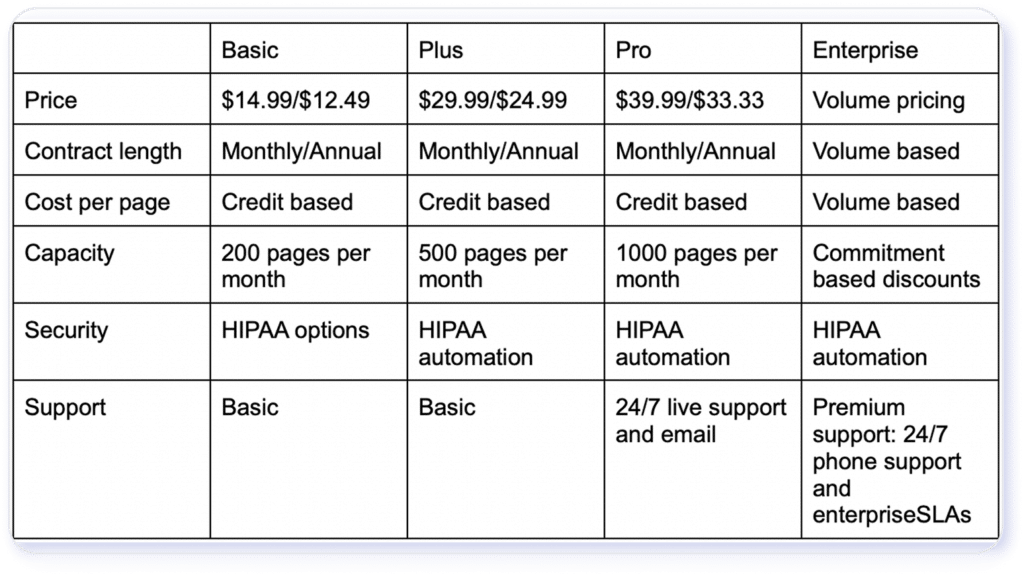
*Pricing and plans listed above are for informational purposes based on iFax as of July 1st, 2026 and may not reflect the most current rates. Confirm with iFax directly for the most up-to-date pricing.
Is iFax’s Free Fax Plan Worth It?
Here’s what you get (and don’t get) with iFax’s free/trial fax plan and when it makes sense (or doesn’t) for real-world use.
What the “free” / trial plan includes:
- iFax offers a free trial that gives you temporary access to the full-featured version of the service, including sending and receiving faxes, using a fax number, and accessing typical features.
- During the trial, you can fax up to 100 pages for free.
- The trial lets you send faxes from any device and works across platforms.
- You can upload common file types (PDF, DOC, images, etc.) and use cloud-based faxing like a paid user during the trial period.
Limitations and Real-World Restrictions:
- The “free” access is time-limited (e.g., a 7-day trial) and can be especially complex to take advantage of, particularly if you’re signing up through an app store.
- For ongoing or regular faxing, the page limit under free/trial (100 pages) may be too small.
- Once the free period ends, features such as a dedicated number, unlimited inbound faxes, and guaranteed security/compliance will require a paid plan.
When the Free Plan Might Be Worth It
The free/trial plan can make sense if:
- You only need to send a single fax or a small batch of documents, e.g., one-time forms, contracts, or small errands.
- You want to test the service before committing, check that uploads, sending, receipt, and document handling work on your devices.
- You’re an individual or a very small-scale user who doesn’t need a permanent fax number or a long-term faxing presence.
It’s Limited for Business or Ongoing Use
For real-world professional or business workflows, the free plan is usually not enough, especially for those that require:
- Inbound and outbound faxing over time,
- Consistent fax number for clients or partners,
- Higher volume of pages,
- Regulated-industry compliance or long-term record keeping
3 Key Limitations of iFax
iFax provides a reliable, occasional, or light-use service, but it may not scale as well for companies that need to balance cost with features.
- The free-trial terms seem especially confusing based on my experience completing the first part of a trial and on numerous reviews on Trustpilot and Google Play.
- The quality of transmission doesn’t seem consistent across the board. Users may end up spending more credits for images that aren’t as good, which, honestly, would frustrate me the most.
- There aren’t enough features in the lowest subscription tier. The site is heavily weighted towards the upsell, which high-tier users may not notice. Again, I would be really frustrated, constantly running into upsells as I navigated the site.
This is a good option for a certain type of user, but someone in a regulated industry looking to take advantage of automated workflows and stronger security protocols might want to explore other options.
eFax®: A Reliable Alternative to iFax
For organizations that rely on faxing in daily operations, eFax offers a more reliable alternative to iFax. While iFax handles basic cloud faxing needs, eFax is built to support consistent delivery, clearer document output, and business-grade workflows.
A key differentiator is fax quality. eFax places greater emphasis on readability and transmission consistency, which reduces the risk of unclear pages or incomplete documents. This matters for contracts, forms, and records where accuracy and legibility are critical.
eFax also provides a smoother signup and onboarding experience. Plan selection is straightforward, setup is guided, and users can begin sending and receiving faxes without navigating heavy trial restrictions or early feature limitations. This makes it easier to evaluate the platform’s full capabilities from the start.
Overall, eFax is better suited for teams that need reliable fax delivery, professional-quality documents, and a clear path from signup to long-term use. While iFax can work for occasional faxing, eFax aligns more closely with ongoing business and compliance-driven requirements.
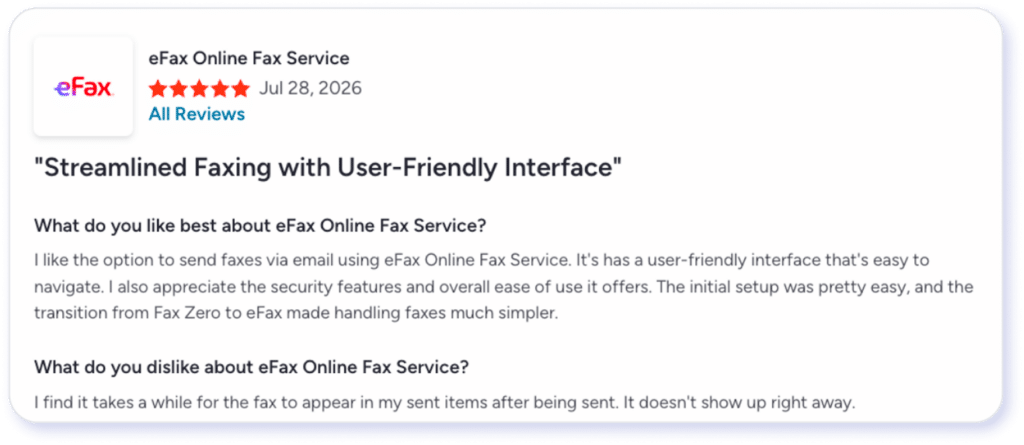
Join over 11 million businesses worldwide who rely on eFax for secure, fast, and modern online faxing.
Switch to eFaxRecognized by leaders, trusted by experts





Frequently Asked Questions
Yes. iFax fully replaces a fax machine and phone line, enabling digital faxing without physical hardware.
Yes. iFax supports browser-based faxing.
Yes, iFax lets users port an existing fax number with a higher subscription tier.
Yes, iFax supports two-way faxing on certain paid plans.
iFax stores faxed documents in a secure cloud archive.
Disclaimer: Statements made in this article are opinions only and based on publicly available information as of 8/10/26. Consensus is not affiliated with iFax and all iFax trademarks, names, or logos referenced remain the property of their respective owners. References to these trademarks, names, or logos are for identification purposes only and do not imply any relationship, sponsorship, or endorsement.
eFax is a registered trademark of Consensus Cloud Solutions, LLC.