12 min read

Disclaimer: Statements made in this article are opinions*
FaxZero — Quick Overview
According to FaxZero’s official website, the platform operates as an online service designed to let users send and receive faxes without requiring a physical fax machine or a dedicated telephone number. The company positions its service as a convenient solution for individuals who lack access to specialized office equipment but need to manage occasional transmissions without visiting a local business center.
Third-party platforms display favorable user reviews for the service, though its interface is visibly dated, reminiscent of early-2000s web design. FaxZero claims on its homepage to have processed over 28 million transmissions to date. Furthermore, the platform’s documentation indicates that it offers two distinct tiers of service, neither of which requires user registration or account creation. Given this unique approach to the digital fax concept, let’s evaluate whether the platform truly delivers on its value proposition.
Customer Reviews: What Users Really Think About FaxZero
FaxZero has a full five out of five stars on Capterra, but with just two reviews. Both reviews were published back in 2023 and don’t offer much in the way of specifics. One does mention that it’s easy and free, but the account is generic.
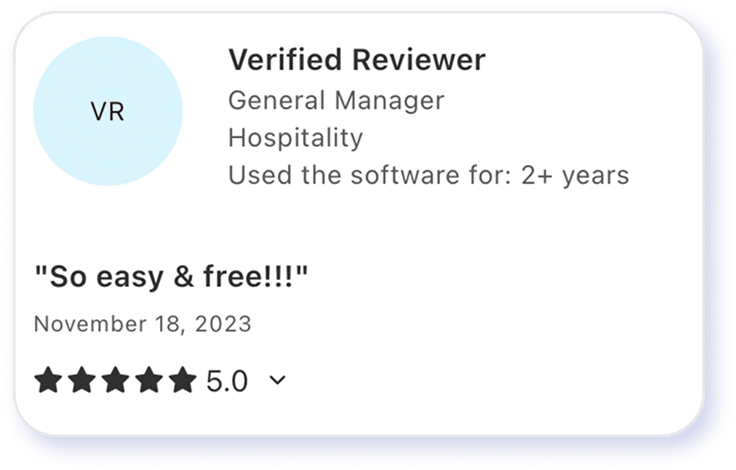
Source : Capterra
It features a 3.1 out of 5 stars rating on Trustpilot with more raters (still just 22) and more recent reviews. People seem to really love them or really hate them, with most complaints centering around uncertainty about how much it would actually cost to send a fax.
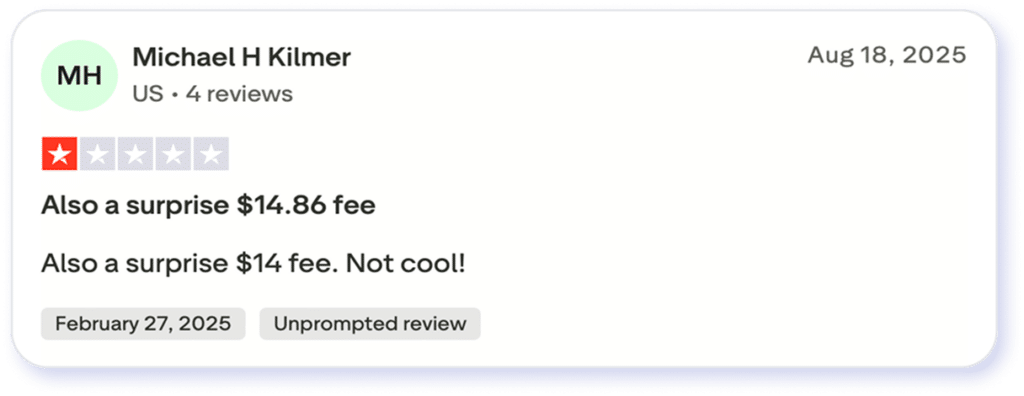
Source : Trustpilot
On G2, the service has a 4.6 out of 5 stars rating based on just 16 reviews. The service overall seems to be pretty under the radar, but here, most reviews were positive. People liked that it was free, not a free trial, and that it didn’t require signing up for any accounts. Users docked points based on the lack of customizations and the fact that free faxes are severely limited.
Source : G2
FaxZero Features Breakdown
Having evaluated FaxZero firsthand, my conclusions regarding the overall process are somewhat mixed.
Fax quality
To determine how well fine details would transmit, I bypassed standard text and opted to test a high-contrast image. FaxZero failed to meet expectations in this regard. Although some degradation is anticipated during standard black-and-white fax conversion, the resulting quality was inadequate. I’ll go over this more in the next section, but this is an immediate red flag.
International faxing
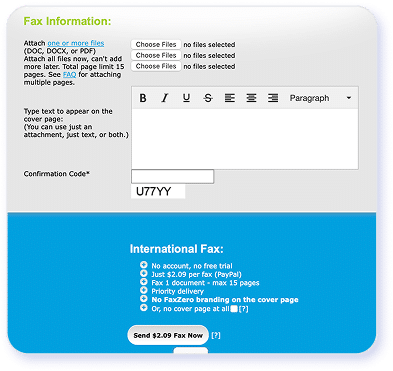
FaxZero allows limited free faxes to the United States, including Puerto Rico, and Canada. It has the capability to send faxes internationally to a wide variety of locations, but the cost is much higher. A fax to France would be $2.09 per fax, and one to the United Arab Emirates would be $7.20 with the same terms. The company does list all available locations and pricing terms.
File formats
Users can fax using several file types, including image files, .docx, and .pdf. The simple upload box shows you where to attach documents. It also lets you type a message for your cover page, though the free version retains FaxZero branding.
Mobile/web experience
The platform lacks a dedicated mobile application, and the web experience is exceptionally basic, featuring a user interface reminiscent of early web design. Pop ads are constant because the company supports the free version through ad revenue. There’s no dashboard or account management, just the fax page and (if applicable) credit card details.
Integrations
There are no integrations because there is no account. The process itself simply sends confirmation emails to your provided address and gives you a link to a temporary private page for a status update. That’s it. It also requires you to complete a CAPTCHA before sending a fax.
Cloud storage
There is no real storage, much less cloud storage. FaxZero basic information about faxes (destination, number, etc) on the server, but claims not to provide data to anyone unless compelled by a court order. Faxes themselves are only stored long enough to provide services and diagnostics and are deleted within three days.
E-signatures, etc.
There’s very little functionality on this site beyond the act of sending the digital fax. The best option here is to use your own markup tool or software to adjust the image before sending the fax.
FaxZero’s Fax Quality & Performance Reviewed
Let’s dive a little deeper into the process of using FaxZero. It’s a little different from other digital faxing solutions I’ve looked at.
Sign-up process
FaxZero doesn’t use a sign-up process or an account-based system. Instead, each time you choose whether to send a free fax or pay for an upgrade. Upgrades include higher page caps and more faxes per day. I don’t know how they keep track of how many you’ve sent on the free plan, but this was very straightforward. Simply choose which option you’d like at the bottom of the page and follow the directions.
From a pure convenience standpoint for single-use clients, I rate the service 4 out of 5 stars due to its zero-registration model. Conversely, enterprise buyers should note that this lack of account infrastructure severely limits corporate oversight and resource management.
Dashboard
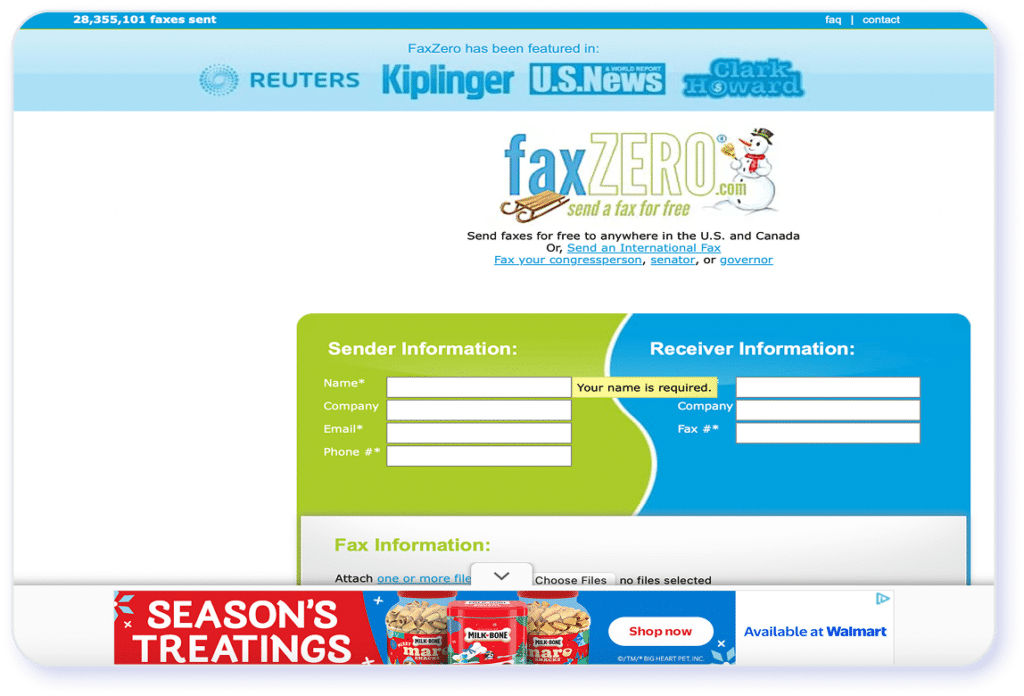
Once again, there’s no dashboard to speak of. Instead, you choose either your free fax option or the paid version, and it navigates you to the fax sheet. For both of these paths, the process is the same. Choosing the paid version takes you to your payment options before sending the fax:
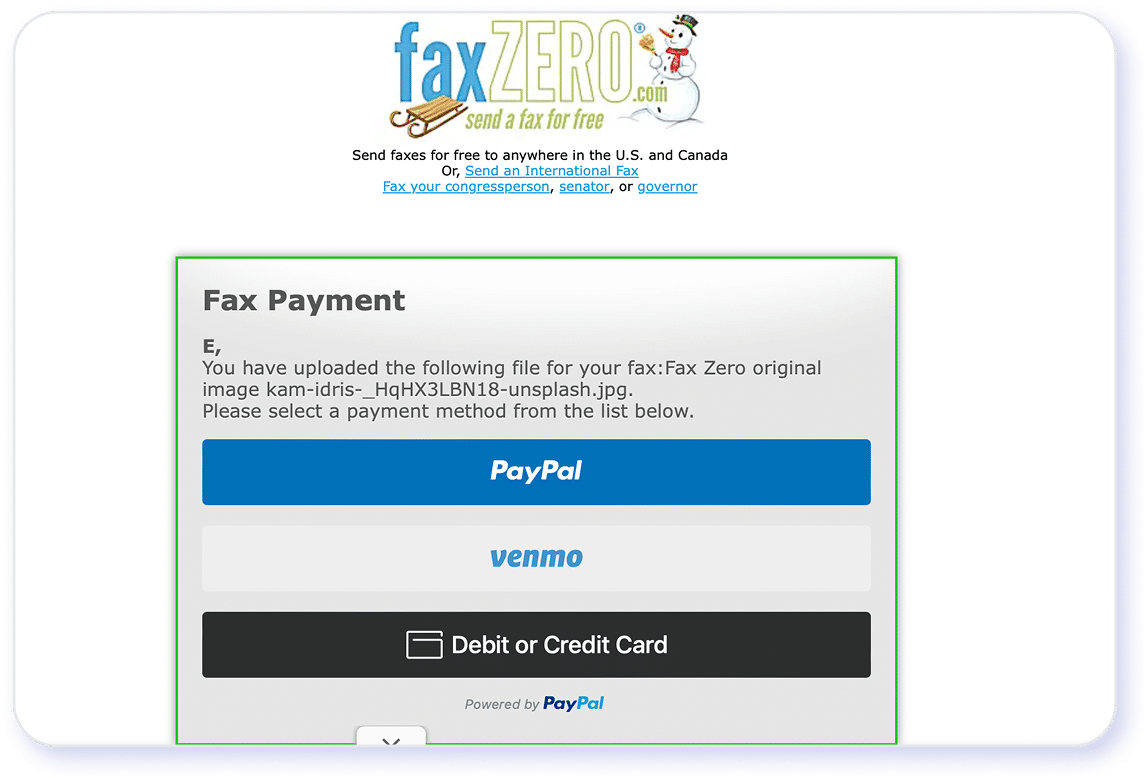
The process was easy, but twice an ad with sound came on, and I had to figure out which one was making the noise before closing it. I haven’t experienced that since early Myspace, so it was jarring. I understand they want to generate ad revenue to support free versions and hosting (and support that decision in theory), but the ads are not well-placed at all.
The final score is 3 out of 5 stars because of the intrusiveness of the ad structure.
Sending faxes
Here is where things start to break down. I didn’t try the paid version because of the confusion in the user reviews, but I did send one free fax. It was fairly simple to upload, and it included the automated cover page with the FaxZero branding. The free path puts a cap on page numbers and then counts the cover page as part of that number. You cannot opt out of the cover page in the free tier, but you can in the paid version, which feels a little frustrating.
The second phase of the transmission process is somewhat unconventional. The platform requires the user to input an email address in the sender section, after which a confirmation message is triggered. To finalize the transmission, the user must navigate to their inbox and click the provided verification link; without this step, the document will not be sent. While this workflow may serve as a helpful security guardrail for some, I found it added unnecessary friction to the experience.
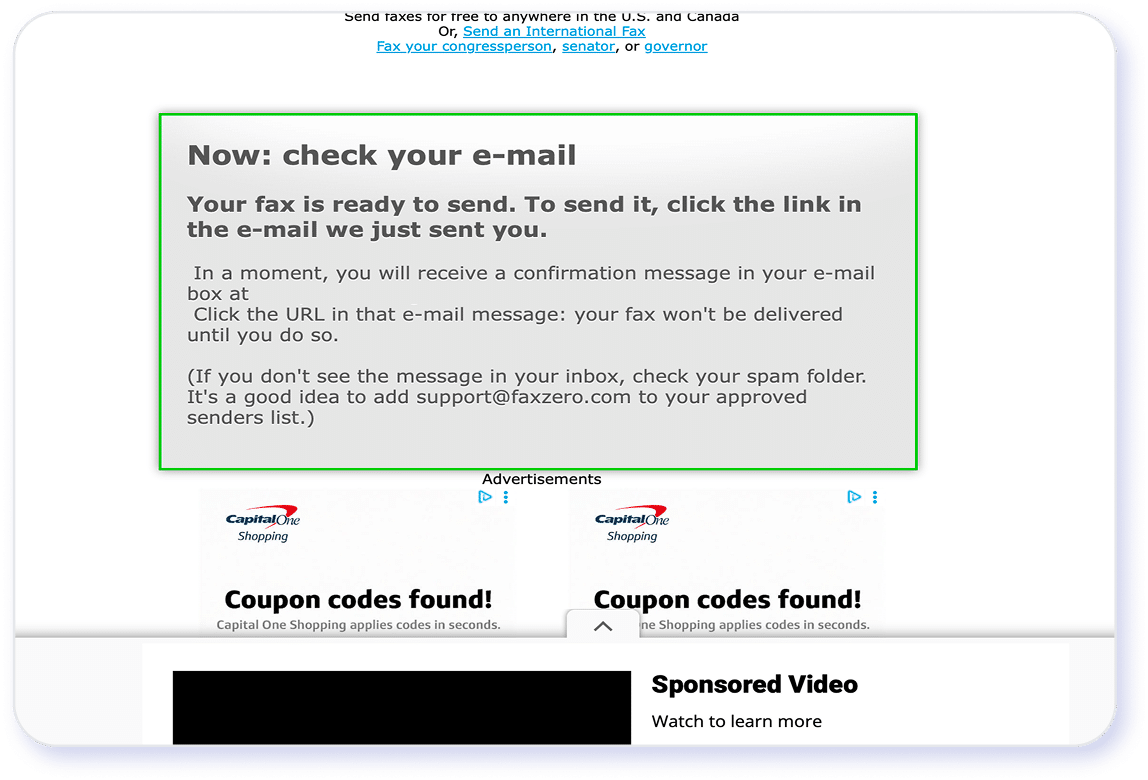
The platform also requires users to provide their phone number, which seems unnecessary given the email-centric verification workflow. I bypassed this requirement by using a standard placeholder number, which the input system accepted without validation. It remains unclear whether the platform utilizes this field to send SMS transmission confirmations.
The site then sends a confirmation to your email.
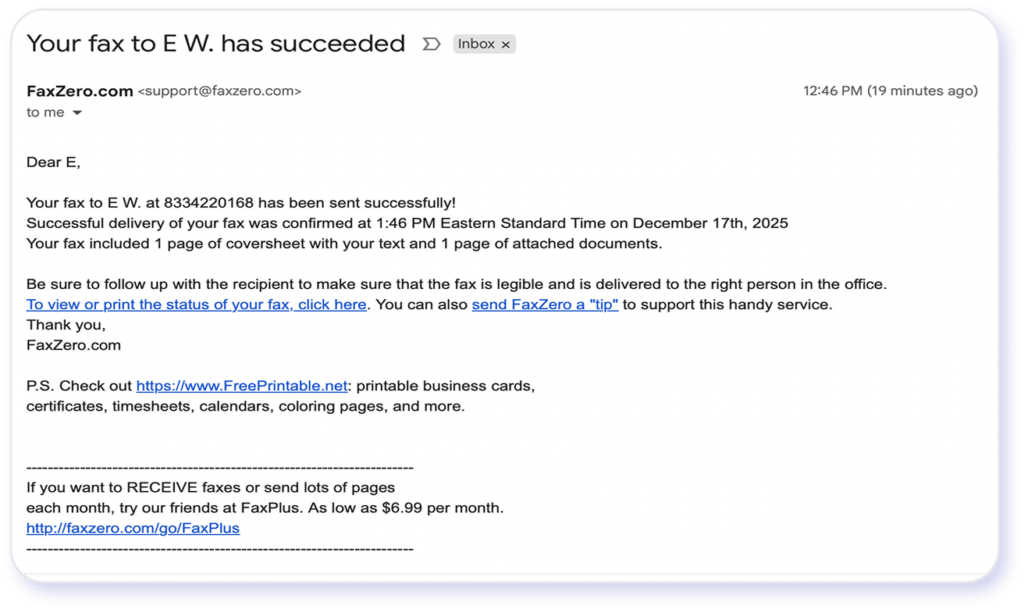
The fax itself was sent very quickly, but the quality is poor. Really poor.
Here is my original image:

And here’s what I got in my inbox:
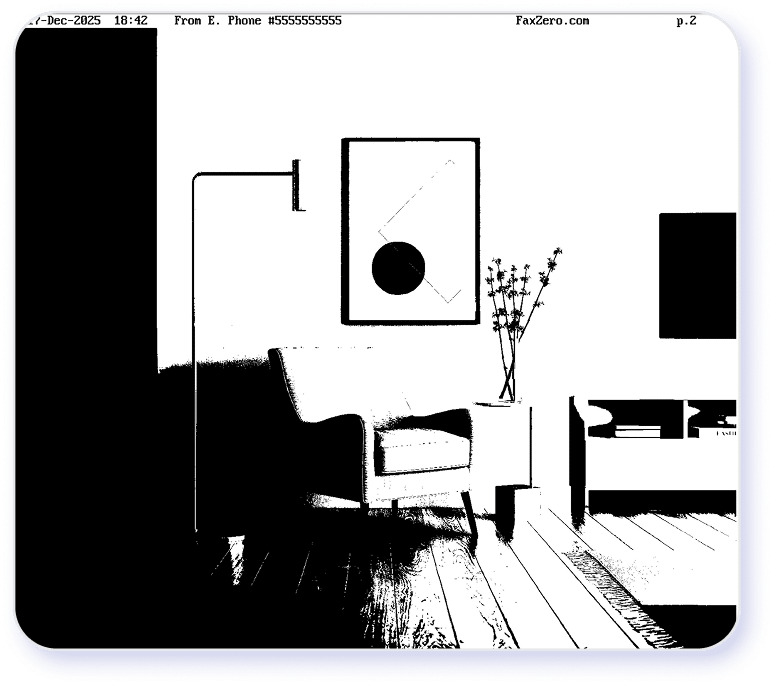
This is not going to work for anything other than basic text-based faxes with plenty of white space to make it easy to read. It’s free, and that’s something, but it looks like it only has basic functionality. I couldn’t find an option to adjust the image quality during transmission, so it seems this is your only option.
User experience
Massive complaints here. The tool is clunky and shows no evidence of web design. I can excuse this because sometimes that’s a more cost-effective and secure option than elaborate UX design. What I can’t excuse is the poor placement of ads. There’s an ad at the bottom. Ads on the sides (that make noise sometimes, the horror), and every time you navigate to a new page, you have to click away a full-page ad before reaching your destination.
Final score 1 out of 5 stars. This feels harsh given their need to generate revenue, but even a little attention to placement and frequency would improve the user experience.
Features and upsells
One good thing about having no account or options is that there are no upsells. You get what you get. Aside from the potential confusion of cost referenced in some user reviews, it’s a straightforward path: paid or free. Paid users have more control over their cover page options and can at least remove the FaxZero branding, but this is designed to be a basic tool overall.
The platform functions strictly as a standalone tool, the service offers no workflow automation or ecosystem integrations. Furthermore, its security profile remains poorly defined, providing only vague claims regarding standard encryption protocols.
The service earns 5 out of 5 stars for its complete absence of upselling tactics, but receives a 2 out of 5 rating for its limited feature set, resulting in an overall score of 3.5 out of 5 stars.
Security Standards and HIPAA Readiness of FaxZero

According to the FaxZero website, the platform meets foundational security standards for data transmission. However, its documentation indicates that advanced security measures and HIPAA readiness leave much to be desired. Here is a breakdown of my findings:
- Encryption in transit: FaxZero supports basic transport-layer encryption for data sent between users and its servers, helping protect faxes during transmission. It does not clearly document end-to-end encryption or advanced encryption key management.
- Data storage practices: FaxZero processes faxes on a short-term basis and does not position itself as a long-term document storage platform. This limits exposure, but also means fewer controls around secure archiving and retrieval.
- HIPAA compliance status: FaxZero does not formally market itself as HIPAA-compliant and does not advertise support for Business Associate Agreements (BAAs), which are typically required for healthcare organizations. I couldn’t find evidence of either of these anywhere.
- Audit trails and access controls: The service offers minimal administrative controls and limited audit logging, which may be insufficient for regulated environments that require detailed access records.
- Compliance documentation: Publicly available documentation on FaxZero’s compliance certifications, risk assessments, and governance practices is limited compared to enterprise-focused fax services.
It looks like its main approach to security is simply limited features and limited documentation. There’s no account or storage to keep track of, and an email-based notification system.
Industry Segments
Where FaxZero Holds Up Well
- Freelancers and independent contractors: May work for occasional faxing needs when document quality is not critical and advanced features are unnecessary.
- Very small businesses with minimal fax volume: Can be sufficient for infrequent, low-stakes faxing where basic send functionality is acceptable, and feature depth is not a priority.
- Personal or one-time use cases: Often used for single documents such as forms or signatures, provided users are comfortable with limited formatting control and inconsistent fax quality.
- Non-regulated, low-risk environments: May fit scenarios where sensitive data is not involved and there is no need for audit trails, secure storage, or administrative controls.
- Occasional international faxing: International faxing is available for users who need it, though it typically comes at a higher per-fax cost and may not suit frequent global communication.
Despite my frustration with some of the process and with the lack of features, FaxZero can meet basic, low-complexity faxing needs. Still, inconsistent fax quality, limited features, and higher international fax costs make it less suitable for business-critical workflows.
FaxZero Pricing & Plans Explained
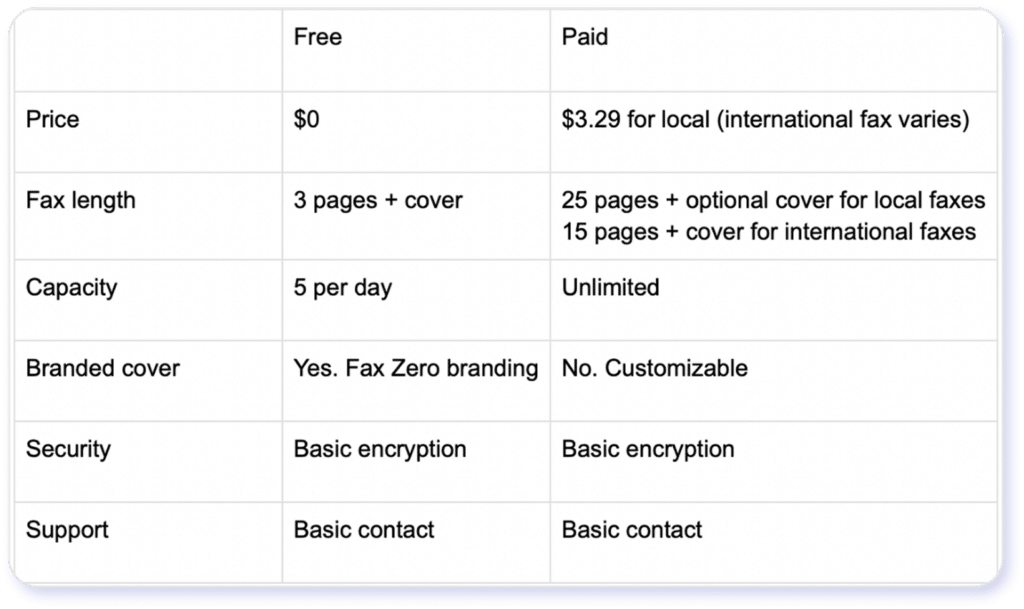
*Pricing and plans listed above are for informational purposes based on FaxZero Pricing as of July 1st, 2026 and may not reflect the most current rates. Confirm with FaxZero directly for the most up-to-date pricing.
Is FaxZero’s Free Fax Plan Worth It?
FaxZero’s free plan lets you send faxes at no cost, but it comes with several limitations that shape its practicality:
- Page limits: Free faxes are typically limited to just a few pages per fax and a cap on the number of free faxes you can send per day.
- Feature restrictions: You don’t get advanced features such as long-term storage, scheduling, batch sending, or user management tools. To be fair, you don’t get this with the paid option either.
- Branding and watermarks: Free faxes often include FaxZero branding or banners on the cover page, which can look unprofessional for business use.
- No inbound faxing: The free plan generally doesn’t support receiving faxes, so you’re limited to outbound only.
- Quality and reliability constraints: Fax quality and delivery success can be less consistent than paid services, especially for larger or international transmissions.
For personal, occasional use, the free plan can suffice for simple one-off faxing needs where limitations aren’t a dealbreaker. For business workflows, those restrictions quickly become burdensome.
5 Key Limitations of FaxZero
- Limited fax quality and reliability: Users often report inconsistent transmission quality and occasional failed deliveries, whereas eFax provides more dependable, professional-grade faxing.
- Basic feature set: FaxZero’s functionality is minimal—no inbound faxing, no scheduling, and no long-term cloud storage—features that eFax includes as part of its core offering.
- No advanced security or compliance tooling: FaxZero lacks documented support for secure storage, audit trails, and compliance controls; eFax Protect delivers stronger encryption, HIPAA-ready safeguards, and business associate agreements where required.
- Page and usage caps: Strict limits on pages per fax and total free sends hinder real-world workflows. eFax’s plans (and free trial) support substantially higher page volumes for both sending and receiving.
- Branding on outgoing faxes: Free faxes from FaxZero include service branding that can appear unprofessional.
These limitations help explain why organizations seeking greater reliability, compliance, and functionality often evaluate eFax as a more capable alternative.
All statements in this article were based on information that was publicly available as of July 1, 2026. Consensus is not affiliated with FaxZero and all third party trademarks, names, or logos referenced remain the property of their respective owners. Any references by Consensus to third-party trademarks are for identification purposes only and do not imply any endorsement or sponsorship.
eFax®: A Reliable Alternative to FaxZero
eFax® is better suited for real-world business faxing because it prioritizes reliability, document quality, and security, where basic fax tools fall short. While FaxZero is designed for occasional, low-stakes use, eFax® supports consistent transmission quality, inbound and outbound faxing, and features that align with professional workflows. This makes a noticeable difference for users who rely on faxing as part of daily operations rather than a one-off task.
Fax image quality is better with eFax®. Users would be able to send faxes with much more detail than FaxZero can provide. For industries that require that kind of detail, this would be a nonnegotiable differentiator.
The sign-up and onboarding experience is also more seamless with eFax®. New users can create an account, activate their free trial, and begin sending and receiving faxes within minutes, with clear prompts and guided setup. Features like cloud storage, number assignment, and page tracking are available immediately. FaxZero’s setup is simpler but more limited, offering fewer tools to manage ongoing fax activity once the initial send is complete.
Security and trust are another key differentiator. eFax® supports encryption in transit and at rest, offers compliance-ready options, and provides access to Business Associate Agreements for organizations handling sensitive data. These safeguards are especially important for healthcare, legal, financial, and enterprise users. FaxZero does not position itself for regulated environments and offers minimal documentation around compliance controls.

Join over 11 million business worldwide who rely on eFax for secure, fast, and modern online faxing.
Switch to eFaxRecognized by leaders, trusted by experts





Frequently Asked Questions
No. FaxZero is designed for outbound faxing only, so users cannot receive incoming faxes or maintain a dedicated fax number.
No. FaxZero processes faxes temporarily and does not offer secure cloud storage or long-term access to sent documents.
It can send short documents, but strict page limits and inconsistent quality make it less practical for longer, business-critical files.
If a FaxZero transmission fails, you won’t complete the fax and won’t be charged for a failed premium fax (full refund for US/Canada; ~90% refunded for international). You may need to verify the fax number and try again.
Disclaimer: Statements made in this article are opinions only and based on publicly available information as of 8/10/26. Consensus is not affiliated with iFax and all iFax trademarks, names, or logos referenced remain the property of their respective owners. References to these trademarks, names, or logos are for identification purposes only and do not imply any relationship, sponsorship, or endorsement.
eFax is a registered trademark of Consensus Cloud Solutions, LLC.