CocoFax Review: Selecting The Right Fax Solution for Your Business

12 min read

Send and receive faxes in minutes.
Disclaimer: Statements made in this article are opinions*
CocoFax — Quick Overview
According to CocoFax’s website, the platform operates as an online service designed to let users send and receive faxes without a physical fax machine. CocoFax claims that its service transmits documents entirely online via desktop interfaces or its dedicated Android mobile application. CocoFax’s marketing materials highlight a highly secure transmission methodology, with CocoFax claiming strict HIPAA compliance alongside advanced security controls, such as two-factor authentication and Payment Card Industry Data Security Standard (PCI DSS) alignment.
Public user reception presents a stark contrast, as CocoFax currently holds highly unfavorable reviews on Trustpilot while simultaneously maintaining favorable ratings on Capterra. To evaluate this discrepancy, I conducted an independent review of CocoFax to determine which consensus more accurately reflects the actual user experience.
Customer Reviews: What Users Really Think About CocoFax
Let’s begin with the bad news. Trustpilot currently ranks CocoFax at 2 out of 5 stars. Reviewers focused heavily on their poor experiences with customer service and on how difficult it was to cancel. In several of the most recent reviews, users reported trying to cancel the service only to be told that someone would be in touch. They never were. Some users mentioned it might be easier to cancel their card than to cancel the service. I reviewed the free plan, so I did not experience this myself, but that does set us up for some concerns right out of the gate.
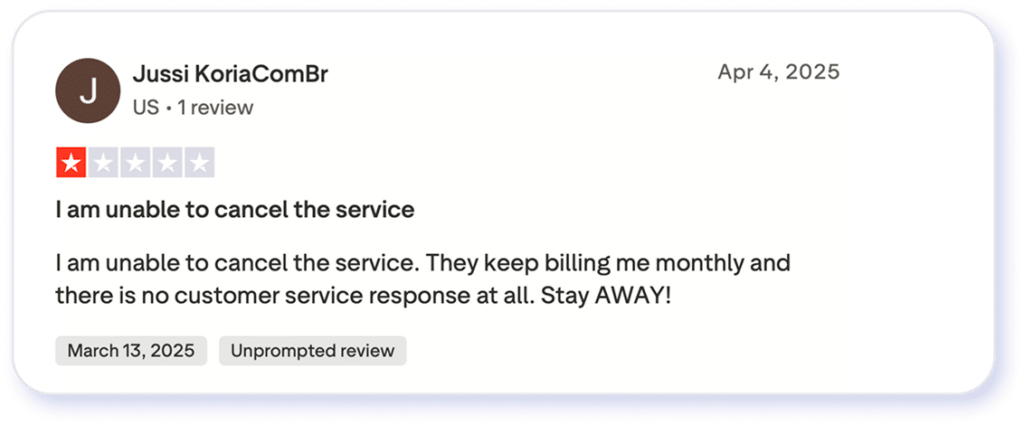
Source: Trustpilot
Capterra’s reviews are better. It’s rated 4.3 out of 5 stars based on 51 reviews. However, the latest reviews were in 2024, and they contained a string of poor reviews about the same problems above: poor customer service and an inability to cancel the service successfully.
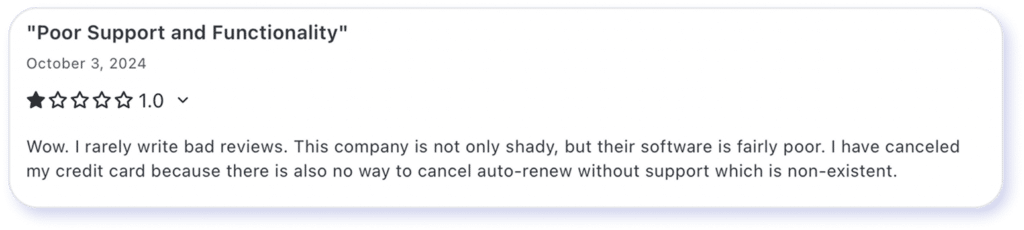
Source G2
G2 reviews are generally positive, with 4.6 out of 5 stars from 188 reviews. The most recent reviews are positive, followed immediately by a 0-star review due to the inability to cancel and frustrating customer service.
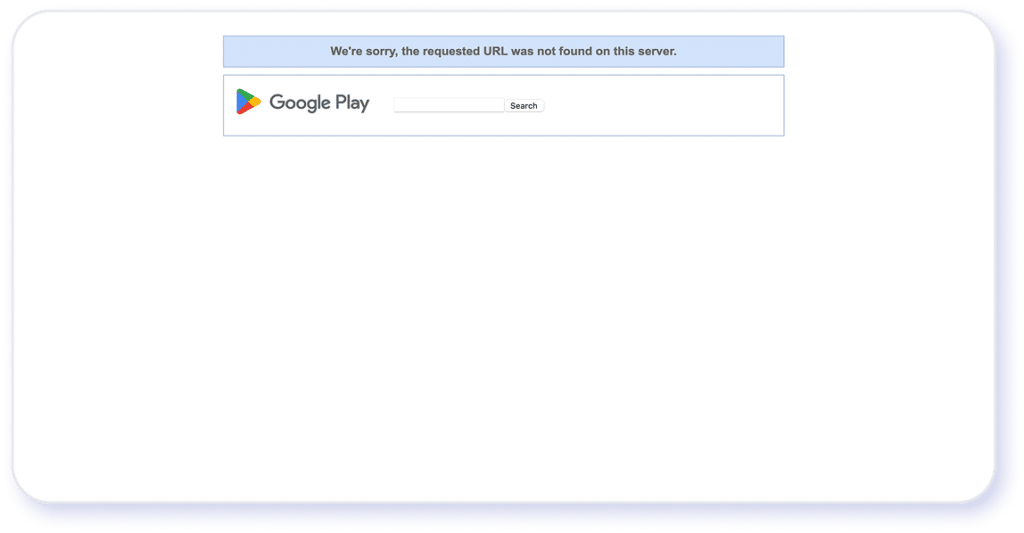
I tried to find the mobile app rating, but the link from the dashboard returns an error page. Overall, it looks like customers had good experiences, but somewhere along the way, an update went wrong that degraded overall satisfaction.
CocoFax Features Breakdown
CocoFax’s website notes the company’s focus on delivering core fax functionality in a modern, cloud-based format, with tools designed to fit into everyday digital workflows. Here’s a closer look at some of the features I explored.
Fax quality
CocoFax’s website notes the company’s focus on delivering core fax functionality in a modern, cloud-based format, with tools designed to fit into everyday digital workflows. Here’s a closer look at some of the features I explored.
International faxing
Users can send and receive faxes internationally without setting up separate phone lines or regional hardware. Coverage includes many global destinations, making it suitable for organizations with cross-border communication needs. I didn’t send a fax internationally, but I didn’t find any complaints about this capability in the reviews I examined.
Supported file formats
CocoFax supports standard business file types, including PDF, DOC, DOCX, JPG, and PNG. Users can upload these files directly via the web interface or transmit them as email attachments for fax delivery. This cross-format compatibility offers operational flexibility, allowing users to handle various file types without requiring prior manual conversion.
Mobile/web experience
CocoFax is accessible through a browser-based dashboard and is supposed to have a mobile app for Android. There doesn’t seem to be an iOS version available currently. This would allow users to send, receive, and manage faxes from desktops, laptops, or mobile devices without additional software.
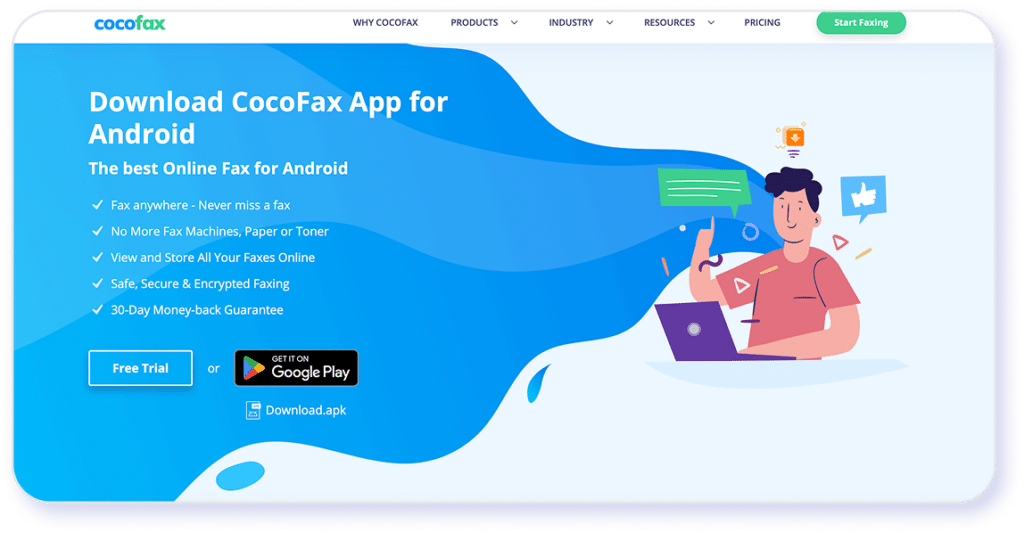
However, when I tried to download the app, I was first led to the company’s landing page and from there to an error message from Google Play. The app may have changed names, but it appears to be nonfunctional for the moment.
Integrations
The platform integrates with familiar tools such as email clients and cloud productivity platforms, enabling users to fax directly from their existing workflows. These integrations reduce the need to switch between systems when handling documents.
Cloud storage and fax management
Incoming and outgoing faxes are stored securely in the cloud, creating a centralized archive that can be accessed anytime. Users can organize, search, and download stored faxes as needed.
E-signatures and document handling
CocoFax supports electronic signatures, allowing users to sign documents digitally before faxing them. This can simplify approval workflows and reduce reliance on printing and scanning. However, it looks like this is handled through a companion website that I did not test. It may require other signups and subscriptions. I’m not a big fan of this option, but it may provide some flexibility for companies looking for those services as well.
CocoFax’s Fax Quality & Performance Reviewed
Let’s get a little more into detail.
Sign up
Sign-up was fairly simple, requiring only a name and a password. You can choose your fax number from the list and create your account. CocoFax claims on its website to have a 30-day money-back guarantee.
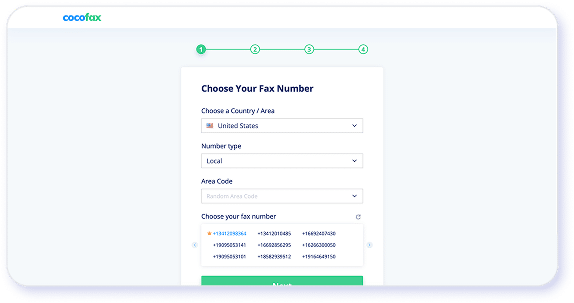
From a user-experience standpoint, the pre-registration workflow lacks transparency. By failing to disclose whether the service is free or requires billing information upfront, the platform compels users to submit personal data without a clear understanding of the service terms.
Final score is 4 out of 5 stars. The setup was smooth, but it could give me a slightly less mysterious sign-up page.
Looking at the CocoFax dashboard
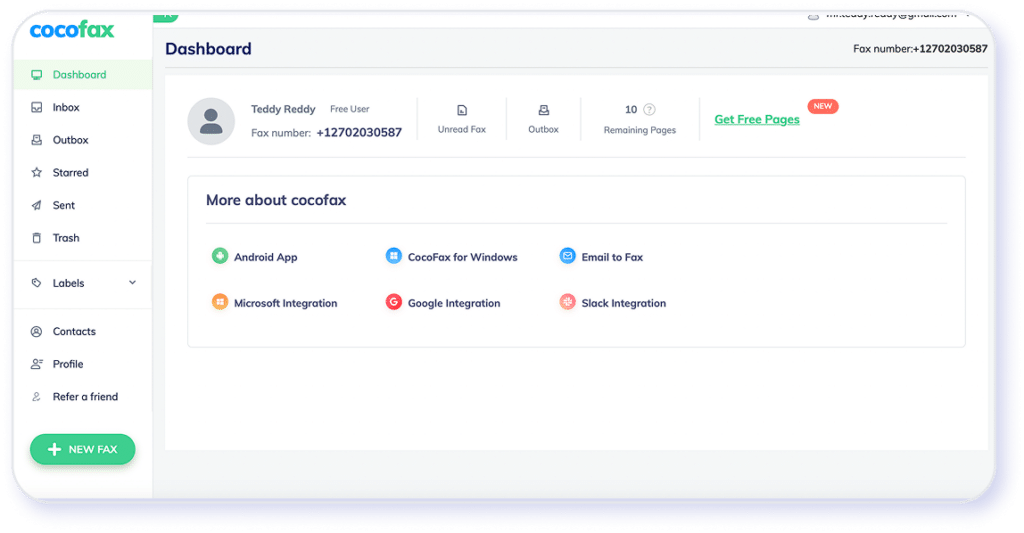
The user interface utilizes a familiar, email-style layout with a left-hand navigation menu. It has automated workflow functions, such as immediate contact logging and systematic tracking of completed transmissions within the sent history.
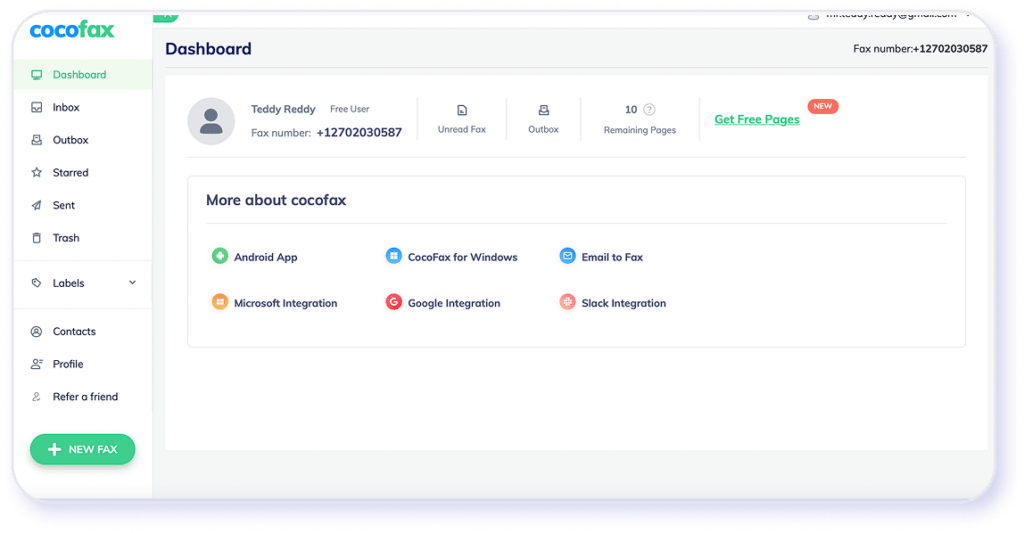
For data management, the interface supports the creation of custom labels to organize faxes.
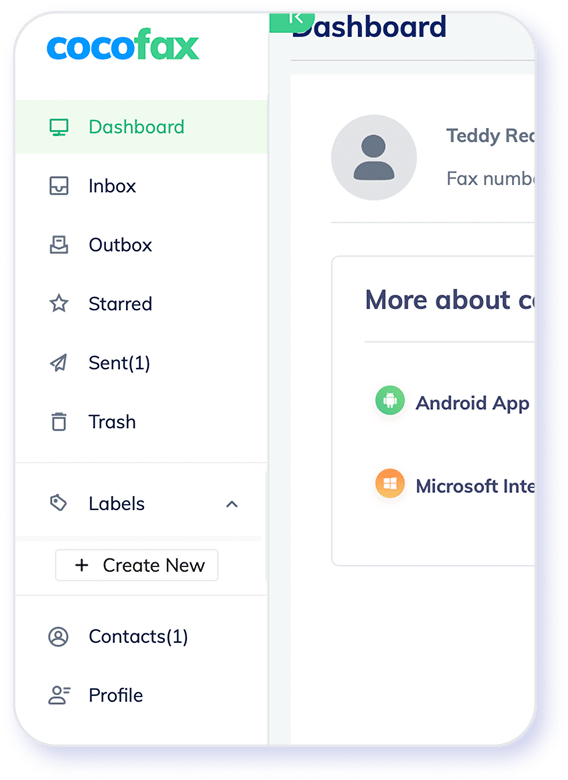
The final score is also 4 out of 5 stars.
Sending faxes
The initial fax process was simple, but there was one hiccup at the beginning. It wasn’t immediately clear from the “send fax” button that I was already on the screen. That may seem like a small thing, but it does make for a small misstep. The button is very clear, but in reality, it looked initially like nothing was happening.
The fax process was straightforward, you upload your fax, add the number at the top, and click send. It pops up with a status bar to signal that the fax has been initiated.
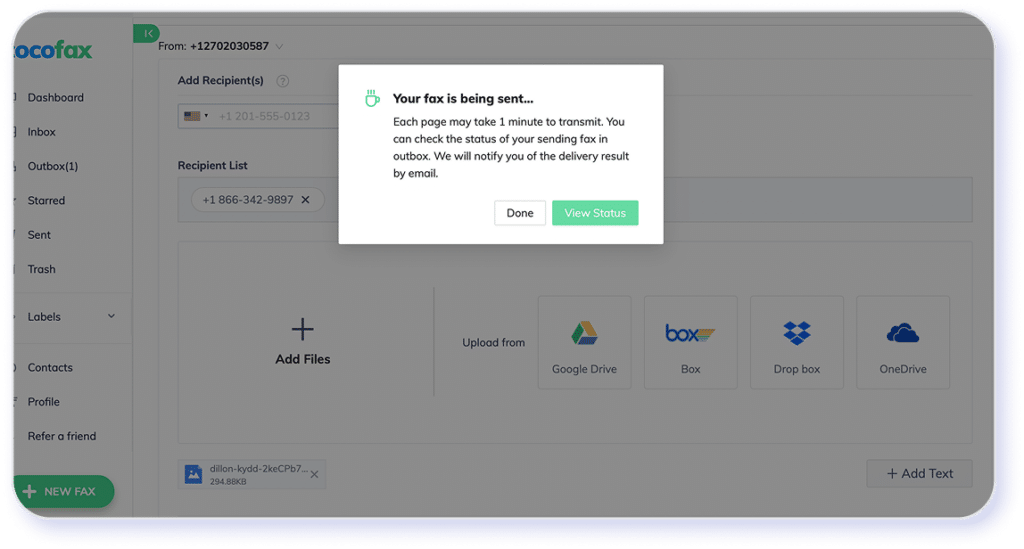
And once that happens, it shows an update to the status of the fax.
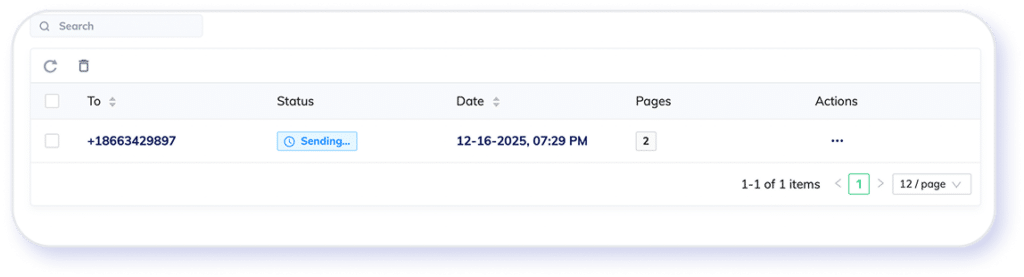
Once sent, the fax moves to your sent box, making this process a lot like checking your email.
Trying to customize the cover page was my first experience with an upgrade message. However, it did allow me to customize a few fax settings as a free user, including resolution, fax intervals, and retries.
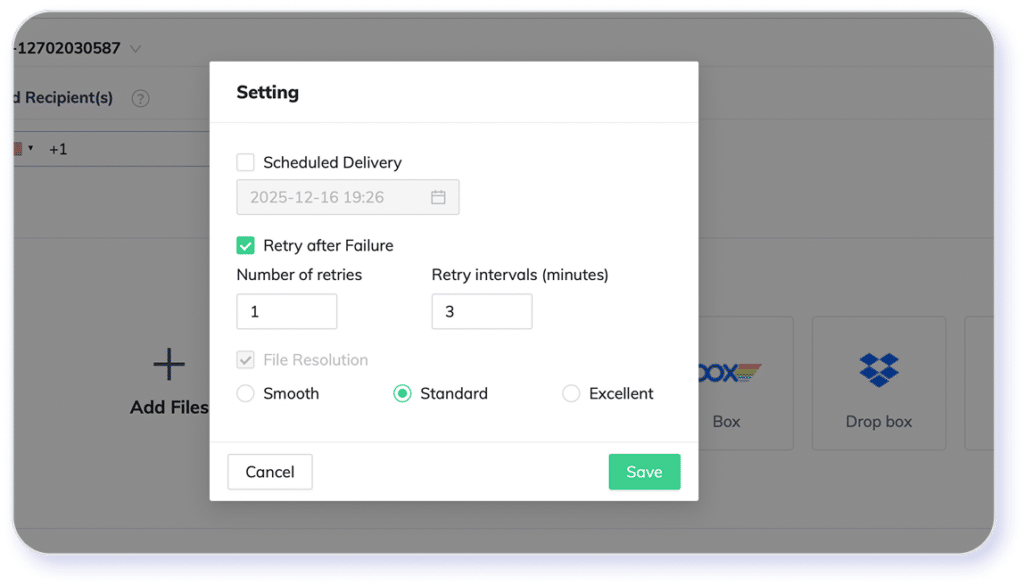
But how were the faxes? The first transmission I made was at standard resolution, and it was not great.
Here is my original image:

And here is what came into my inbox a few seconds later.

That’s not going to work for most people. Faxes that are predominantly text-based with some good white space will probably be acceptable, but this image is nearly unreadable. It’s unclear whether this is supposed to be a “medium resolution” option or simply a standard.
Next was an option labeled “smooth.” Again, very unclear what this is supposed to mean. The contrast is better, but the resolution is worse. It took just a few seconds to send.

Sending a fax on the “excellent” standard option brings up a notification that it may take longer to transmit on this setting. It took about a minute to send this way.

This is very disappointing. It’s virtually indistinguishable from the standard image but took much longer to send. This probably wouldn’t work for organizations that need a lot of fine detail.
My final score is 2 out of 5 stars. The fax quality doesn’t pass muster for anything more than a simple text fax. This wouldn’t work for most mid-range to heavy users.
User experiences
The user experience is fair, and I would rate the platform higher if the fax quality were better. The overall faxing process is straightforward, providing quick access to all the necessary tools for occasional transmissions. Even when selecting the highest resolution option, delivery takes only about a minute.
Ultimately, however, the subpar fax quality remains too disappointing to justify a higher rating.
My final score is a 3.5 out of 5 stars.
Features and upsells
There are quite a few upsells for this, but I was pleasantly surprised by what I had access to in the free tier. I didn’t have trouble finding contacts or adjusting fax intervals. It did allow me to set up some basic cloud storage and organization workflows. I didn’t see a lot of other options, but it’s possible they appear as you upgrade your subscription tier.
Final score 3.5 out of 5 stars. There are only basic features on my dashboard, which avoids much of the upselling popups, but it would be nice to have more options.
Security Standards and HIPAA Readiness of CocoFax
CocoFax does have a few security standards in place. Here’s what I found.
- Encryption standards: CocoFax uses industry-standard encryption to protect data in transit and at rest. This helps safeguard faxed documents as they move between senders, recipients, and cloud storage environments.
- Secure data storage: Faxes are stored in secure cloud environments with access controls designed to limit unauthorized use. It looks like users can manage retention through their account, though long-term retention policies are largely user-managed rather than prescriptive.
- Account and access controls: CocoFax supports features such as password protection and optional two-factor authentication. These controls help reduce unauthorized account access but may require administrators to configure them manually.
- HIPAA readiness: CocoFax states that it is HIPAA-compliant and can be used in healthcare environments when configured correctly. However, HIPAA compliance is mainly dependent on how the organization manages user access, retention policies, and internal procedures. However, it looks like this option is more about configuration than a turnkey solution like eFax.
- Business Associate Agreement (BAA): CocoFax may provide a BAA upon request, but I couldn’t find if this were positioned as a standard, built-in part of onboarding. Healthcare organizations typically need to confirm the availability and execution of a BAA before deployment. eFax has stronger healthcare-specific documentation.
- Audit and compliance tooling: CocoFax offers basic activity tracking, but more advanced audit trails, reporting, and compliance automation are limited compared to enterprise-focused fax providers. eFax features several built-in workflow and reporting tools to smooth this out.
Industry Segments
Where CocoFax May Hold Up Well
CocoFax may provide a fit for organizations that need basic, cloud-based fax functionality for routine document exchange. It aligns best with use cases where simplicity, accessibility, and convenience matter more than advanced compliance controls or industry-specific safeguards.
- Small businesses and startups: CocoFax can support occasional faxing needs such as general business forms, invoices, or internal documents without requiring dedicated hardware.
- Freelancers and independent professionals: Individuals who need to send or receive documents as part of day-to-day operations may find CocoFax’s email and web-based faxing sufficient.
- Administrative and office support teams: CocoFax works well for general administrative tasks, including internal paperwork and non-sensitive external correspondence.
- General service-based organizations: Businesses that exchange standard documents with partners or vendors may benefit from CocoFax as a straightforward faxing tool.
Overall, CocoFax may be best suited for lower-risk, non-regulated use cases. Organizations operating in regulated, highly structured, or data-sensitive environments may require a more robust solution with built-in compliance, auditing, and governance capabilities
CocoFax Pricing & Plans Explained*
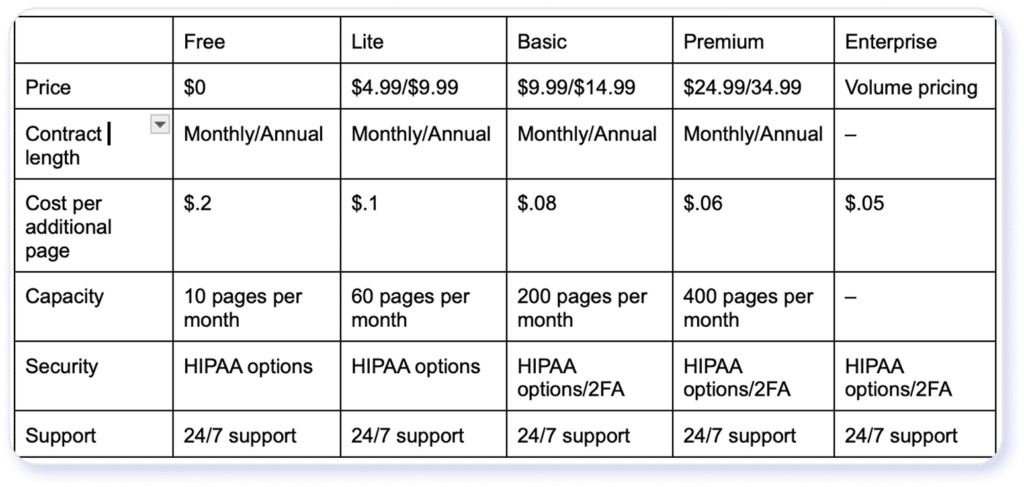
*Pricing and plans listed above are for informational purposes based on CocoFax Pricing as of July 1st, 2026 and may not reflect the most current rates. Confirm with CocoFax directly for the most up-to-date pricing.
Is CocoFax’s Free Fax Plan Worth It?
According to the CocoFax website, the free plan allows 10 fax pages per month. Keep in mind that this includes a cover page, so each single-page fax you send will count as two pages toward that limit. Unless you only send occasional faxes, you’ll probably hit the limit really quickly. You’ll hit the limit even quicker if you send multi-page faxes. I’m over halfway through my limit just in testing this service out.
Real-world business workflows will likely blow past this before the month is over. For personal use, yes, the free plan can probably cover the periodic fax.
Businesses, however, especially those in highly regulated fields like healthcare or those that need fine detail, like real estate, should probably switch to a more robust service with built-in automations and security protocols as a given.
4 Key Limitations of CocoFax
My biggest concern with CocoFax is the recent influx of poor reviews about its customer service and cancellation processes. I only tested the free version myself, so I can’t speak to whether it was difficult to cancel or not. Many of the reviews, especially on TrustPilot, are very specific about continued charges long after trying to cancel and the lack of customer service response. I would make your own best judgment for that. Other gaps in CocoFax’s service that stood out to me are:
- Free trial and initial page allowance: CocoFax offers a limited free fax option with a low page count. eFax’s free trial includes significantly more pages upfront, making it easier to test the service with real workloads before subscribing.
- Compliance-oriented workflow features: CocoFax supports basic faxing needs, but for organizations with compliance or audit needs, these may require some finagling.
- Support responsiveness and service documentation: Some users note slower support turnaround or limited help documentation with CocoFax. eFax has broader documentation and a reputation for more responsive customer support.
- Enterprise-grade administration: The CocoFax limitations across many lower-tier subscription plans make it challenging for organizations to set up workflows and maintain compliance.
Again, without experiencing the cancellation process myself, I’m left with questions and some reservations about the service.
All statements in this article were based on information that was publicly available as of July 1, 2026. Consensus is not affiliated with CocoFax and all third party trademarks, names, or logos referenced remain the property of their respective owners. Any references by Consensus to third-party trademarks are for identification purposes only and do not imply any endorsement or sponsorship.
eFax®: A Reliable Alternative to CocoFax
eFax® offers a more robust trial and onboarding experience, making it easier for users to evaluate the service before committing. The 7-day free trial includes up to 170 pages, allowing teams to test real-world fax workflows rather than rely on limited or one-time-use scenarios.
Storage is another area where eFax® tends to provide more flexibility. Sent and received faxes are stored in the cloud with greater capacity and more accessible management tools, which can be helpful for users who need ongoing access to historical documents rather than short-term retention.
For organizations with governance or oversight requirements, eFax® includes more compliance-oriented features. Built-in support for audit trails, documentation, and structured workflows helps reduce reliance on manual configuration and internal workarounds.
eFax® also provides more extensive help and support resources. Its documentation and support channels are designed to assist users during setup and ongoing use, which can shorten onboarding time and simplify issue resolution as fax needs scale.
Ultimately, their fax quality was just better than CocoFax. When it comes down to it, if I were choosing between services, a good-quality fax across all tiers would be a significant factor in which service I ultimately chose. The CocoFax quality was a real disappointment, so I’d turn elsewhere.
Join over 11 million business worldwide who rely on eFax for secure, fast, and modern online faxing.
Switch to eFax
Recognized by leaders, trusted by experts





Frequently Asked Questions
Yes. CocoFax works through a web dashboard and email-based faxing, allowing users to send and receive faxes without installing desktop software.
Incoming faxes are delivered to the user’s online inbox and can also be forwarded to email for easy access and recordkeeping.
Yes. CocoFax allows users to attach multiple supported files to a single fax, which are combined and sent as one transmission.
Yes. CocoFax supports browser-based faxing, allowing users to send and receive faxes without installing desktop or mobile apps.
Yes. CocoFax supports fax number porting, allowing users to transfer an existing fax number to the service.
Disclaimer: Statements made in this article are opinions only and based on publicly available information as of 8/10/26. Consensus is not affiliated with iFax and all iFax trademarks, names, or logos referenced remain the property of their respective owners. References to these trademarks, names, or logos are for identification purposes only and do not imply any relationship, sponsorship, or endorsement.
eFax is a registered trademark of Consensus Cloud Solutions, LLC.