How to Fax Business Cover Sheets
To fax a business cover sheet, include your company name, contact information, recipient details, fax number, subject, and total page count, then place it before the documents you’re sending. With eFax, you can add a professional business cover sheet and transmit your fax digitally without using a traditional fax machine.
Before you begin
- You need an active eFax account to use the web portal or desktop app.
- Your account includes a dedicated local or toll-free fax number.
In This Article
- How to send a business fax cover sheet from a computer
- How to send a business cover sheet from email
- What is a business cover sheet
- Why a professional cover sheet matters.
- Key elements of a business fax cover sheet
- Best practices to create a business cover sheet
Download Free Printable Business Fax Cover Sheet Templates
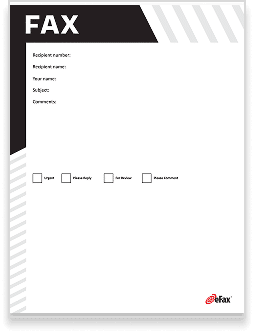
To make your business communications more efficient, we offer a set of professional fax cover sheet templates that are free to download and use. Each template is designed to be customizable so you can add your company’s branding and details.




How to Send a Business Fax Cover Sheet from a Computer
- Download one of our free business fax cover sheets or use your own.
- Customize it, adding information such as company name and sender information, recipient information, date, time, number of pages, and any additional notes.
- Open up the eFax Portal or mobile app.
- Click on the option to send faxes.
- Enter the recipient’s country code and fax number.
- Attach your documents.
- Click send.
How to Send a Business Fax Cover Sheet from Email
- Download one of our free business fax cover sheets or use your own.
- Customize it, adding information such as company name and sender information, recipient information, date, time, number of pages, and any additional notes.
- Open up your email, such as Outlook or Gmail.
- Type the recipient’s fax number in the To field, followed by @send.efax.com. For example: [email protected].
- Type a short message (optional).
- Attach the cover sheet and your document.
- Click send.
Need a different type of fax cover sheet? Download free, customizable fax cover sheets form our library.
With business communication, first impressions matter.
A professional fax cover sheet introduces the sender and the purpose of the fax. It also assures that the information is delivered to the correct recipient without confusion. Whether you need to send important contracts, client documents or internal memos, a well-structured fax cover sheet can help you maintain a professional image.
Learn about business fax cover sheets, why they matter and how to get free templates to simplify your faxing process.
The Importance of a Confidential Fax Cover Sheet
Providing a confidential fax cover sheet before a fax message is critical for organizations operating in highly regulated industries like financial services, healthcare, law, telecommunications and pharmaceuticals. These industries have specific regulations that outline how organizations should handle and manage customer data, such as the California Consumer Privacy Act (CCPA), the Gramm-Leach-Bliley Act (GLBA), the Health Insurance Portability and Accountability Act (HIPAA) and the Payment Card Industry Data Security Standard (PCI DSS).
Key Elements of a Business Fax Cover Sheet
To create a professional and functional business fax cover sheet, you should include several important elements. These details help the recipient identify your fax and ensure the information is properly understood and routed. By including these elements, you make sure your fax is properly structured, professional and ready for delivery.
Company Logo & branding:
Your logo or branding should be prominently displayed to identify your company. This adds a professional touch and reinforces brand recognition.
Date, Time and Number of Pages:
Include the date and time of the transmission, as well as the total number of pages. This ensures the recipient knows exactly what to expect.
Date, Time and Number of Pages:
The confidential fax cover sheet should include the date and time the original fax message was sent and the sender’s name. The cover sheet should also state how many pages are in the fax so the recipient can verify they received the entire message.
Sender Information:
Include the sender’s full name, position and contact information (email, phone number). This makes it easy for the recipient to reach out if needed.
Recipient Information:
Clearly state the recipient’s name, department and company. Accurate details help you make sure your fax gets into the hands of the right person.
Subject or Purpose of Fax:
In the subject line, briefly describe the reason for sending the fax. This gives context to the recipient about the contents contained within.
Notes or Special Instructions:
Optionally, you can use a section of your cover sheet to highlight any specific actions needed. You can also provide further clarification on the contents.
4 Best Practices to Create Business Fax Cover Sheets
To make your fax cover sheet as effective as possible, follow these best practices:

Use company branding for a professional look
Your fax cover sheet should represent your business well. Always include your logo and maintain consistent branding across all communications.
Ensure clarity with recipient and sender details
Double-check that all contact information is correct, and make it clear who is sending the fax and who should be receiving it. Any errors in this section could cause delays or miscommunication.
Include a confidentiality statement if necessary
If your fax includes sensitive or private information, add a confidentiality notice. This can prevent unauthorized individuals from viewing the contents if the fax is delivered to the wrong person.
Double-check fax content and number of pages before sending
Before you hit send, make sure all necessary documents are attached and that the page count matches what is listed on the cover sheet. This prevents confusion or incomplete transmissions.
Streamline Your Business Faxing with eFax
Traditional faxing can be cumbersome and time-consuming, especially if you use outdated equipment. eFax offers a modern solution that enables you to send and receive faxes directly from your computer, smartphone or tablet. This saves and helps make sure your communications remain secure and organized.
eFax provides features like document encryption and cloud storage, which makes fax storage and management easier. With cloud storage, you can access all your faxes digitally at any time to eliminate the need for physical storage or filing systems. Plus, if your business deals with a large volume of faxes, eFax simplifies the process and helps maintain the security of your sensitive documents.
FAQs About Business Fax Cover Pages
A business fax cover sheet should include the company logo, sender and recipient information, the date and time of the fax, the number of pages being sent, the subject or purpose and any additional notes or special instructions.
Yes, you can easily customize a business fax cover sheet to fit your specific needs. You can add your logo and company name and adjust the layout to match your branding. Many fax cover sheet templates allow you to enter your information directly or update the design.
Online services like eFax are great tools for streamlining the faxing process. These tools allow you to send and receive faxes via email, store documents securely in the cloud and use encryption to protect sensitive information.


