How to Fax HIPAA Cover Sheets
To fax a HIPAA cover sheet, include the sender’s and recipient’s contact information, fax numbers, a confidentiality notice, and instructions for handling misdirected faxes, while avoiding unnecessary patient information. eFax offers secure online faxing solutions that help healthcare organizations transmit sensitive documents and support HIPAA compliance.
Before you begin
- You need an active eFax account to use the web portal or desktop app.
- Your account includes a dedicated local or toll-free fax number.
In This Article
- How to send a HIPAA fax cover sheet from a computer
- How to send a HIPAA fax cover sheet from email
- What are HIPAA fax cover sheet and why are they important
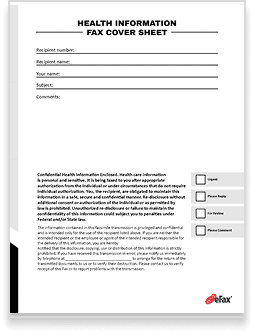
- Key elements of a HIPAA fax cover sheet
- Best practices to create a HIPAA cover sheet


How to Send a HIPAA Fax Cover Sheet from a Computer
- Download one of our free HIPAA fax cover sheets or use your own.
- Customize it, adding information such as company name and sender information, recipient information, date, time, number of pages, and any additional notes.
- Open up the eFax Portal or mobile app.
- Click on the option to send faxes.
- Enter the recipient’s country code and fax number.
- Attach your fax files.
- Click send.
How to Send a HIPAA Fax Cover Sheet from Email
- Download one of our free HIPAA fax cover sheets or use your own.
- Customize it, adding information such as company name and sender information, recipient information, date, time, number of pages, and any additional notes.
- Open up your email, such as Outlook or Gmail.
- Type the recipient’s fax number in the To field, followed by @send.efax.com. For example: [email protected].
- Type a short message (optional).
- Attach the cover sheet and your document.
- Click send.
Need a different type of fax cover sheet? Download free, customizable fax cover sheets form our library.
When you’re sending faxes that contain protected health information (PHI), it is crucial to ensure that the patient information lands in the right hands.
Healthcare providers who fax PHI without including safeguards like a HIPAA fax cover sheet are vulnerable to fines and legal repercussions.
In this article, we’ll discuss the importance of using HIPAA fax cover sheets, some of the key elements to include in your fax cover sheet, and links to free templates you can use with your faxes.
Why Are HIPAA Fax Cover Sheets Important?
A key component of a HIPAA-compliant cover sheet is a confidentiality statement, which indicates that the information in the fax is PHI for viewing and use only by authorized entities. This disclaimer allows senders to prove that they’re committed to protecting PHI.
When your document contains PHI, you should plan to include a HIPAA-compliant fax cover sheet on both physical and digital faxes. The details on the fax sheet let the receiver know that the contents of the fax are confidential.
Key Elements of a HIPAA Fax Cover Sheet
There are six key elements that a good HIPAA-compliant fax cover sheet should include. These elements help ensure the fax is delivered to the correct recipient and that the patient’s private information remains secure. We’ll break them down for you below.
Sender Information:
The name and the fax number of the individual sending the fax. This can also be a business or company name and number.
Receiver Information:
The name and fax number of the intended fax recipient. In the case of HIPAA faxes, the receiver may not be the patient but instead, another clinic or office. If sending to a physician’s office, include the office fax number and the name of the intended recipient (like a doctor receiving a referral or medical records).
Patient name and reference number:
The patient’s name and the reference number of their case. This is essential when faxing documents between healthcare providers.
Date and time:
The date and time you sent the fax makes it easy to keep track of and report on in the case of an audit.
Number of Pages:
Include the total page count of the faxed documents on the fax cover sheet. This lets the receiver know if they received the entire document or if forms or pages are missing.
HIPAA Disclaimer:
A HIPAA disclaimer tells the recipient what to do if the fax was accidentally delivered to the wrong number or did not send all of the pages. In these cases, the HIPAA disclaimer helps to maintain the patient’s information privacy.
3 Tips for Writing a HIPAA-Compliant Fax Disclaimer
When you create your HIPAA-compliant fax disclaimer, use these three tips to make it effective:

Clearly State Your Intent
Make it clear that the fax contains protected health information (PHI) and that the fax is HIPAA-compliant.
Include a Legal Warning:
Add a statement that unauthorized disclosure or use of the fax documents is against the law and may result in legal action.
Provide Instructions for Unauthorized Recipients:
Include information in case an unauthorized recipient accesses the fax. Instruct them to destroy the contents and notify the sender.
How to Create a HIPAA-Compliant Fax Cover Sheet
To create a HIPAA-compliant fax cover sheet, follow this step-by-step guide:
Choose the right template
Above, you can pick from several templates and download the best fit for your use case.
Fill in all of the necessary sections
Use a word processor or document editing application. Make sure to include the sender/recipient information, the date and time, and the HIPAA disclaimer.
Include the required elements
The intent statement, legal warning, and instructions for unauthorized recipients.
Customize the sheet
Fill in the sheet to meet your specific needs, including uploading your company logo and changing the branding to match your business.
FAQs About HIPAA Fax Cover Pages
No, not every fax cover sheet meets HIPAA-compliant standards. A compliant fax cover sheet includes a confidentiality statement, instructions for fax handling in case it’s delivered to the wrong person, sender and recipient information, and a sensitive information disclaimer.
Use a secure fax service like eFax to send HIPAA-compliant faxes, and include a fax cover sheet that indicates the fax contents contain PHI. Double-check that you have the correct recipient’s fax number.
No! You should always use a HIPAA compliant fax cover sheet with specific disclaimer and other information. This will help protect sensitive PHI.
Unauthorized disclosure of PHI, which can lead to fines and penalties for violating HIPAA regulations, is one consequence of failing to include a HIPAA fax cover sheet with your sensitive documents.
Creating and managing HIPAA fax cover sheets is now made easy with online fax services like eFax. Send and receive fax messages in a jiffy with HIPAA compliant fax cover sheet templates, auto resend for busy fax numbers, and automatic delivery confirmations.


