
last updated Updated
September 22, 2026
3 min read

 Customers & Business
Do you occasionally send or receive faxes? If so, purchasing a personal fax machine might not be cost-effective, as fax machines can be an expensive investment. Fortunately, there are affordable options when searching for fax services near me, including some retail stores and public libraries.
In this article, we’ll cover everything you need to know about faxing documents from a library, including how-to guides, cost comparisons, and much more.
Can You Fax Documents From a Library?
Yes, you can fax documents conveniently from many public libraries. However, not every branch has a fax machine so you will want to check ahead before making the trip.
How To Fax From The Library
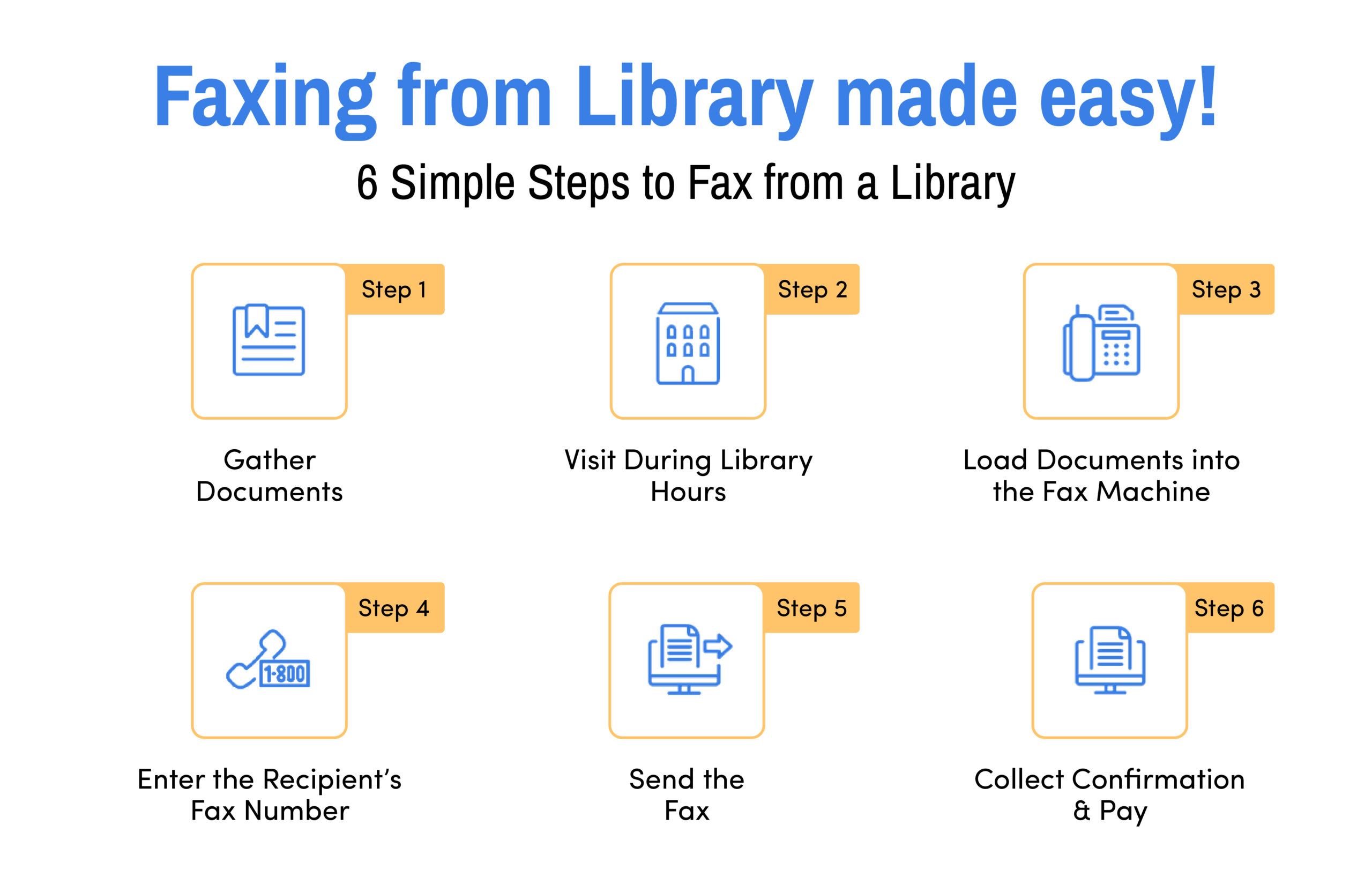
When you arrive at the library, ask the person at the counter where the fax machine is and how to use it. They’ll show you and walk you through the process step-by-step if you need help. However, the process is pretty straightforward.
Step 1: Gather and Organize Documents
Gather all the documents you need to fax and make sure you have.the recipient’s fax number handy.
Step 2: Visit the Library during Operating Hours
Visit the library during its open hours. Check the operating hours on the library’s website or call them to confirm.
Step 3: Load Documents Correctly in Fax Machine
While loading your documents into the fax machine, place them in the document feeder according to the machine’s instructions, which might be face-up or face-down. If you’re unsure, don’t hesitate to ask the library staff for help.
Step 4: Enter the Fax Number Correctly
After loading your documents, dial the recipient’s fax number using the keypad on the fax machine.
Step 5: Send the Fax
Libraries have instruction manuals for using their fax machines. Follow the guide and press the “Send” or “Start” button to begin the faxing process. Wait for the machine to confirm that the fax has been successfully sent.
Step 6: Collect Confirmation and Pay
Keep the confirmation receipt as proof of successful faxing. Afterward, pay any required fees at the circulation desk or another designated location.
How Much Does It Cost to Fax at the Library?
There’s no absolute answer to how much does it cost to fax at the libraries as you’ll find different costs depending on the library system and location. In general, the average cost of faxing falls between 25 cents per page and $1 per page. On average, faxing a single page costs around 50 cents. The total cost depends on factors such as the number of pages and the destination, whether local, long-distance, or international.
While a single page may not be much, longer faxes can get expensive. For instance, faxing 50 pages at the library could cost approximately $25 to $50. By comparsion, eFax® pricing includes up to 200 pages to US and Canada for $4.99 for the first month. A Business account, includes up to 500 pages and includes international faxing to 51 countries for $14.99 for the first month. The eFax® cost is far more economical if you plan on sending multiple pages or more than just a one-time fax.
Why eFax® is a Better Option than Faxing from the Library
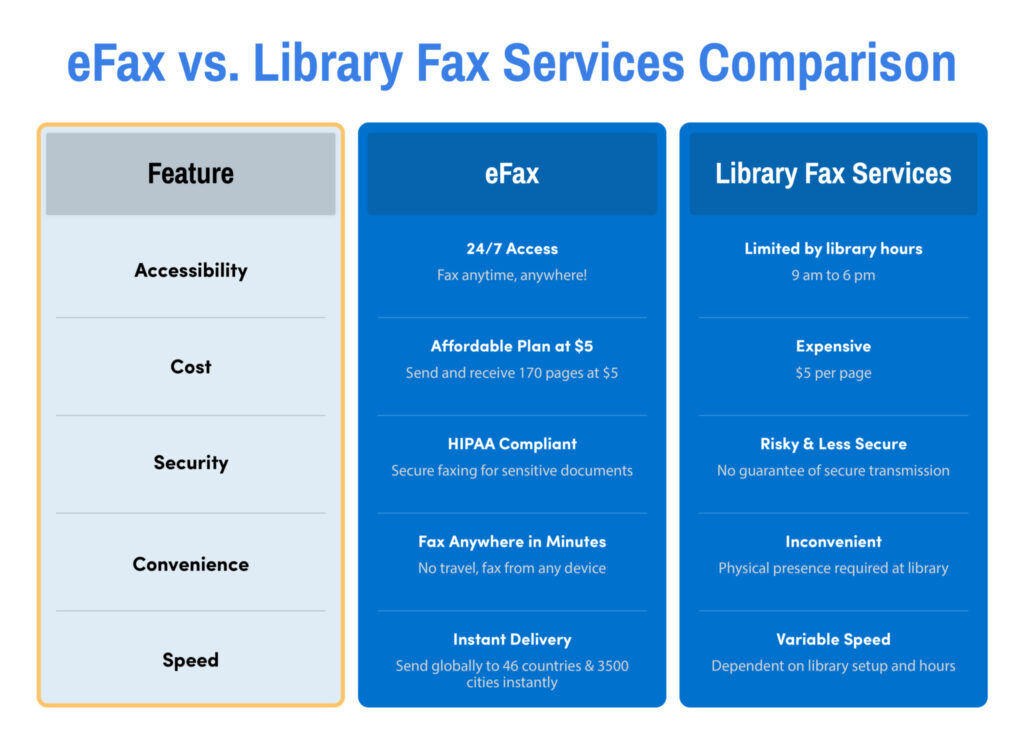
For most people, eFax® is a better alternative to library faxing, offering a cost-effectiveness and convenient way to send faxes from anywhere on your connected device. Features include:
- Flexibility: eFax allows you to send and receive faxes anytime, from any location. All that is needed is a stable internet connection and your mobile phone.
- Affordability: eFax’s subscription plans are designed to fit your usage needs, making it a cost-effective option compared to traditional library faxing.
- Security: eFax services are HIPAA compliant, ensuring a secure method for transmitting sensitive and confidential information.
- Digital Capabilities: With eFax, you can digitally sign documents and utilize cloud storage for easy organization and access. eFax supports various file formats, enhancing its versatility.
Millions of customers trust eFax for secure, convenient online faxing and user-friendly interface to send and receive faxes directly from your mobile phone, laptop, desktop, or tablet in minutes.
FAQs Around Faxing From Library
Yes, some local libraries have fax machines available for public use. You will have to pay to use the library fax machine.
Typically, the cost is about 50 cents a page, although fees range from 25 cents to $1 depending on the location. There may also be extra fees for sending a long-distance or international fax.
The limit to the number of faxes that can be transmitted can vary from library to library. Some libraries may restrict the number of pages you can fax at one time. It’s best to inquire about any limits by calling or visiting the library.
Generally, the answer is no. While there may be exceptions, most public libraries only support outgoing faxes. So, if you’re trying to figure out how to receive a fax without a fax machine, the library won’t be an option. Instead, you use an online service like eFax®.
Yes, library fax services are reliable and provide a secure way to send your documents. However, it’s important to note that the security level may vary. For highly confidential information, you might prefer a service that offers enhanced security measures, such as eFax, which is HIPAA compliant.
If you want to use the library fax machine, you need to do so in person. However, you can use eFax® and save the trip. eFax® enables you to send and receive faxes digitally from your computer, phone, or other connected device using the eFax® mobile app.